
Broadcast Replay Copyright: What actually happens when you upload your broadcast to YouTube
Even if it is my broadcast, there are layers in the video that I did not create, such as games, music, and video sponsorship. In Chzzk and SOOP Terms and Conditions, who has the right to replay, why music that was played on air is blocked on YouTube, the difference between Content ID ownership claims and copyright violation warnings, and even the inspection order before uploading are all organized based on official documents.

ClipSpray Team
 ClipSpray
Key takeaways
- I own the rights to the parts I filmed and edited. Both Naver's Terms of Use and SOOP's Terms of Use, to which Chzzk belongs, are set that way. The problem is someone else's copyrighted work included in the video.
- Guaranteed use of music guided by SOOP is premised on broadcasting on SOOP. The reasons for exclusion from coverage listed in the notice include ‘use in areas unrelated to the service,’ so uploading to YouTube is outside of that coverage.
- Content ID claims usually only affect videos, not channels or accounts. However, shorts that exceed 1 minute but are less than 3 minutes long will be blocked regardless of rights holder settings if there is an active claim.
- Copyright violation warnings are different in nature. If three times are accumulated, all channels connected to the account may be terminated, and even if you complete copyright school, it will expire after 90 days.
- The video sponsorship section sent by a viewer is the section where someone else's YouTube video is played directly on your screen. Czizyk guides you through sponsor responsibilities, but it is my channel that receives the ownership claim after cutting the section and uploading it to YouTube.
Even though I cut and upload my broadcast, it gets blocked on YouTube. The reason is simple. There is only one replay file, but the rights inside it are multiple layers, and most of what YouTube captures are layers that I did not create. This article summarizes the actual points of trouble and the order to check before uploading, based on Chzzk, SOOP, and YouTube's official documents. It is not legal advice, but more of a checklist for editors.
This is my broadcast, why is copyright a problem?
I have the rights to my broadcast video, but other people's copyrighted work in that screen does not belong to me. The fact that I was the one who turned on the camera and pressed the record button, and what was recorded on that screen are separate issues.
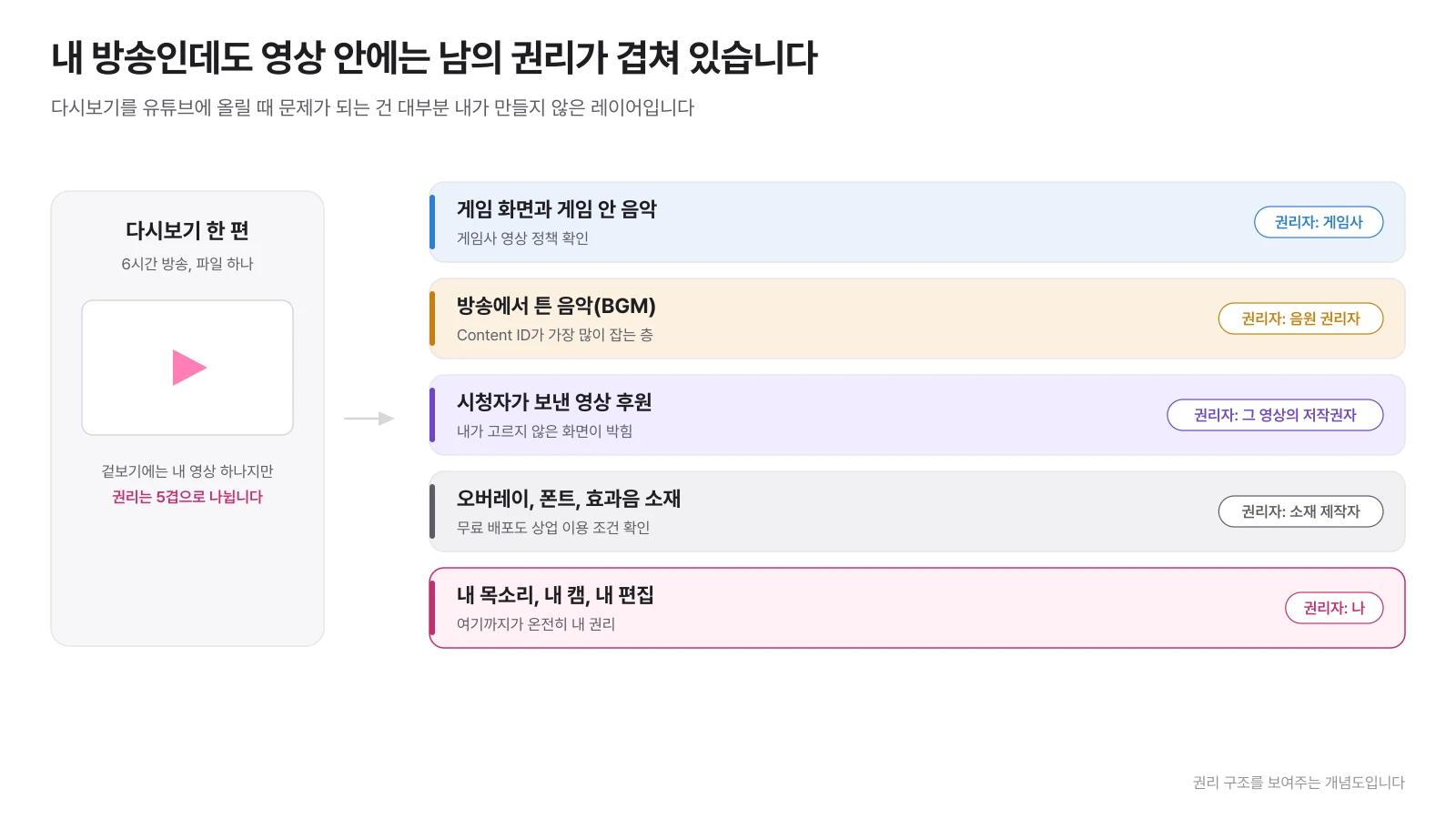
If you watch a replay of an episode, there are usually five layers. Game screens and in-game music belong to the game company, songs played on air belong to the sound source rights holder, video donations sent by viewers belong to the creator of the video, and overlays, fonts, and sound effects belong to the material creator. What is entirely mine is my voice, my cam, and the editing composition I created.
So, instead of asking “Can I upload this video?”, you should change the question to “What floors are in this section?” to make the decision faster. In reality, the section where problems occur is usually determined, and if you avoid or fix that section, you can use the rest as is.
Watch Chzzk and the Forest again, who has the rights?
Both platforms stipulate in their terms and conditions that the copyright of content created by members belongs to the creator. What the platform takes is not ownership, but the right to use it to run the service.
Chzzk is a Naver service, so Naver Terms of Use applies. The terms and conditions clearly state, “Of course, you have the rights, including intellectual property rights, to the posts you create and post,” and continue to state that Naver receives permission to use them to the extent necessary for the exposure and operation of the service. SOOP Terms of Use Article 24, Paragraph 3 also stipulates that "The copyright to a member's content shall be held by the original author, but the right to use the content shall be granted to the Company or a person designated by the Company in accordance with the provisions of these Terms and Conditions."
In summary, the platform terms and conditions do not prevent me from editing my broadcast and uploading it somewhere else. The real gateway is the other person's copyrighted work included in the video.
However, in practice, what is more urgent is a different problem. The original must remain for editing and explanation. Starting November 5, 2025, Chzzk is applying different retention periods for replays by grade.
| Rating | Posted Replay Archive | Quantity of replays provided |
|---|---|---|
| Rookie | 30 days from the date of creation, 7 days if there are less than 100 viewers | 2 (up to 34 hours) |
| Pro | 60 days from creation date, 14 days if there are less than 100 viewers | 2 (up to 34 hours) |
| Partner | Permanent storage | No restrictions |
Replays that are not posted will be deleted after 2 days regardless of the rating, and deleted videos will not be restored. One episode can be stored for up to 17 hours, and longer broadcasts are divided into 17-hour units (Chizyk Customer Center). Expiration calculations by grade, including SOOP, are summarized in Summary of Replay Storage Period , and storage settings and backup methods are separately summarized in Summary of Chzzk Replay .
Why is music that was played on air blocked on YouTube?
This is because the guarantee of music use provided by the platform is premised on broadcasting on that platform. This is why, although nothing happened during the broadcast, an ownership claim is made as soon as the same section is uploaded to YouTube.
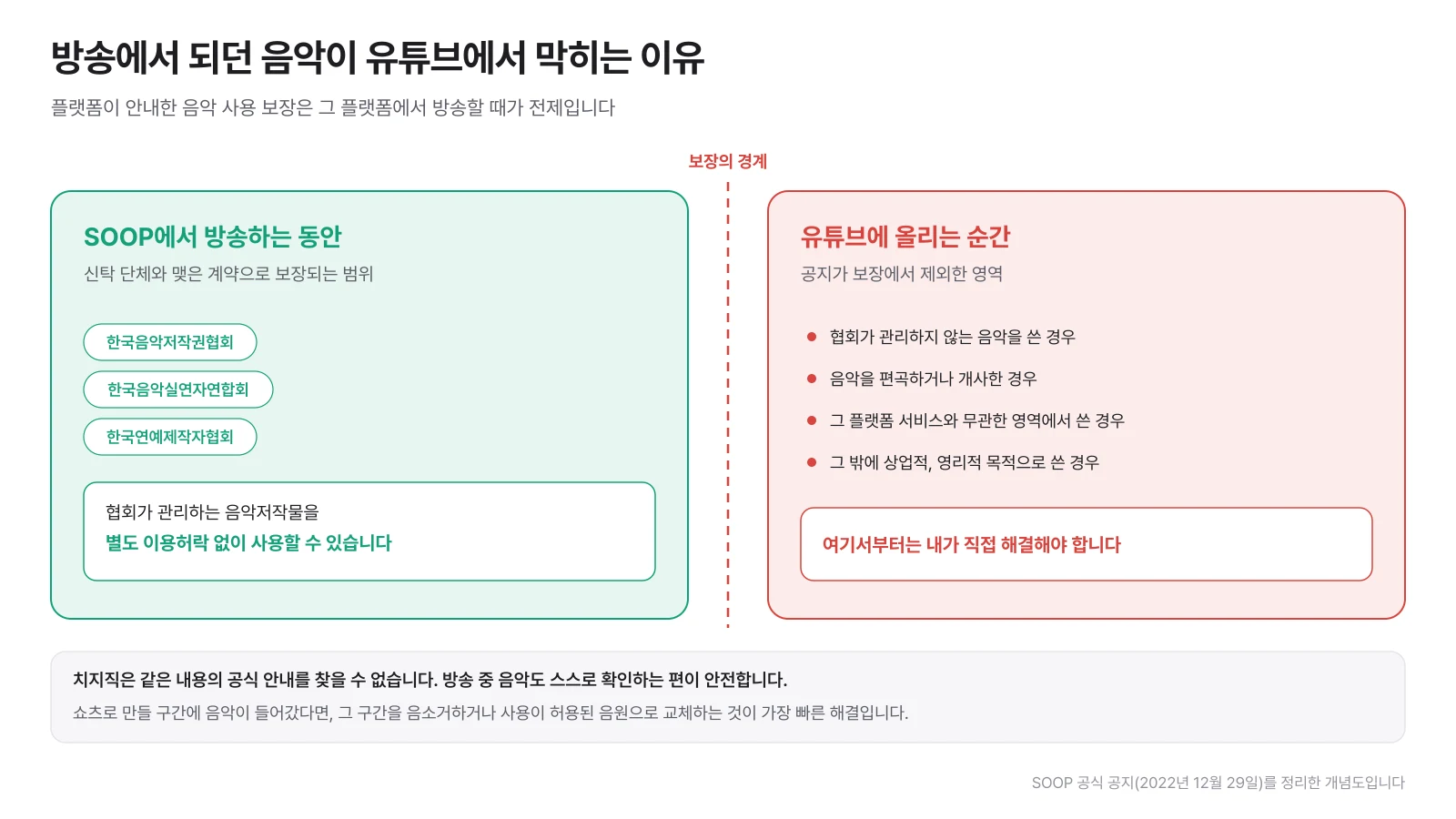
In the official notice ](https://afwbbs1.sooplive.com/app/index.php?b_no=8344&board=notice&control=view), SOOP announced that it has partnered with the Korea Music Copyright Association, the Korea Music Performers Association, and the Korea Entertainment Producers Association, and that "Users may use musical works managed by the association without separate permission when broadcasting on the Afreeca TV service." And right below, we have listed five cases where rights are not guaranteed, one of which is "cases where music is used in areas unrelated to the Afreeca TV service". YouTube uploads are exactly that.
Cizizik could not find any official guidance on the same. Just because it hasn't been verified doesn't mean it's allowed, so it's safer to check the music you play when broadcasting on Cizizik yourself.
There are three methods available at the editing stage.
- Avoid the section: As long as the song is playing, just remove it from the shorts list. This is the cheapest and most reliable method, so most people end up here.
- Track Separate Recording: If you record the microphone, game sounds, and music on separate tracks from the beginning, you can later export them without the music. The setting method is in How to separate OBS audio.
- Mute or replace: If it is already mixed, mute the section and replace it with a new sound source that is allowed to be used.
What happens to the revenue if music is included in the shorts?
Regardless of permission, the revenue distribution of the shorts itself will change if a track that YouTube counts as music is included. In the Shorts Monetization Policy, YouTube explains that for shorts that do not contain music, all related revenue belongs to the creator pool, and if one music song is included, only half is allocated to the creator pool, and if two or more songs are included, only one-third is allocated to the creator pool. The rest goes to music licensing fees.
The actual share that creators receive is 45% of the amount so allocated. This calculation refers to when YouTube uploads music for which it has secured a license, and if a sound source mixed in without permission is caught by Content ID, it is not distributed, but is blocked or transferred to profit according to the rights holder's settings. This means that whether or not to include music is not a matter of taste, but also a matter of cost.
Why is the section through which viewer video support passes dangerous?
Video sponsorship is a function that plays another person's YouTube video as is on your broadcast screen, so if you cut out that section and upload it, you are uploading someone else's video. The screen that I did not choose is stuck in my replay.
Chzzk Video sponsorship information explains that sponsorship can be made with YouTube videos and Chzzk clips, and notes that if a video that infringes a third party's copyright is sponsored, the sponsor is responsible for the resulting disadvantages and legal liability. However, that sentence does not remove the responsibility of the broadcaster, and more than anything, I am the one who cut that section and uploaded it to YouTube. This is also where claims or removal requests arrive.
If you really want to use the reaction because it's fun, you should go for processing the sponsored video so that it doesn't show up on the screen. Since vertical shorts capture the screen anyway, it is possible to use only the cam and my reactions in a larger format and push the sponsored video area off the screen. It is meaningless if the sound is included, so please check the original audio as well.
Can I upload the game screen as is?
Publishers of games frequently played by Korean streamers have public policies for individual creators, and within that scope allow video posting, advertising, and sponsorship revenue without separate permission. However, there are conditions, and those conditions vary from company to company. Below are four places where we have personally checked the policy documents.
| game company | Post video | Advertising and sponsorship revenue | Be especially careful |
|---|---|---|---|
| Riot Games | allow | Allow passive revenue with pre-roll, midstream, and overlay ads | Content blocked by charging barriers, such as Patreon or membership, is prohibited without a written contract |
| Nexon | allow | Allow advertising and sponsorship revenue on a platform that anyone can view for free | Profit from sources other than advertisements and donations is prohibited, and links to related channels are indicated when game music is used |
| Krafton (PUBG) | allow | Allows for advertising revenue, viewer sponsorship, and subscription revenue with free-to-view | Restrictions on paid access and prohibition of sales, prohibition of leakage of undisclosed information, prohibition of use of IP to promote third-party games |
| Nintendo | allow | Only systems designated by Nintendo, such as the YouTube Partner Program, can be used | Before release, use only official public materials, no posts copied without creativity or input |
If the game is not in the table, find the official document first by using “Game name + video guidelines” or “Game name + content creation guideline”. Most publishers will have an article with the same name, but if not, look at the content clause in their terms of use.
YouTube also has separate standards. YouTube advises in its Video Game and Software Content Policy] to minimize use of games unless they are properly licensed. This means that even if the game company allows it, YouTube monetization review is considered separately.
What is the difference between a claim and a copyright strike?
One is the loss of profits, and the other is the loss of the channel. Both are copyright issues, but they have completely different weights, and in reality, they are often talked about together.
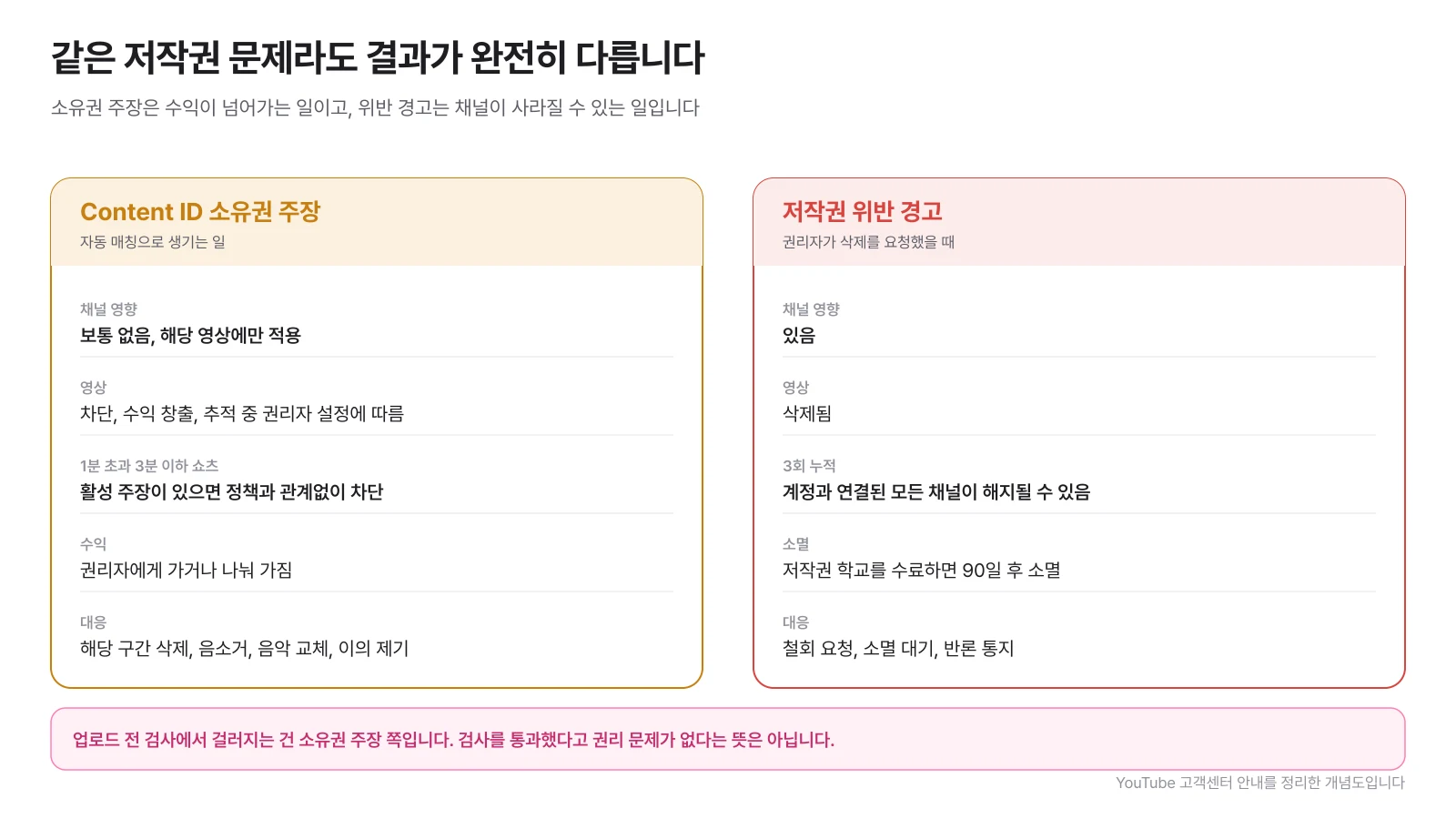
Content ID ownership claim is created through automatic matching. It usually affects only that video, not the channel or account, and depending on the rights holder's settings, it is blocked, revenue goes to the rights holder, or only viewing statistics are collected. However, there is one exception for shorts. Shorts longer than 1 minute but less than 3 minutes long will be blocked regardless of rights holder settings if there is an active ownership claim. If you are a channel that focuses on shorts, this provision is effectively the same as deletion.
Copyright violation warning occurs when the video is taken down after the rights holder submits a valid deletion request. The video will be deleted, and if three times are accumulated, all channels associated with the account may be terminated. Even if you complete copyright school, it takes 90 days for it to expire. Claims resulting from automatic matching do not themselves result in warnings.
What is filtered out in the copyright check on the upload screen is the ownership claim. YouTube also informs us that the test results are not final, so the fact that it has passed the test should not be read as confirmation that there are no rights issues.
What happens to clips or broadcasts made by others?
Even if my broadcast is the material, the resulting clip has been handled by the person who created it, and there is no official statement that external re-uploading is allowed. Chzzk Clip usage guide explains that clips can only be created during live broadcasts permitted by the streamer, up to 100 per day and 1,000 per month, and that URL sharing and player embedding are supported as sharing methods. There is no guidance on re-uploading to YouTube in that document.
So the practical standard is simple. If you need the same scene, cut it directly from the original replay. The quality is better than the original and the rights relationship is reduced by one layer. The procedure for making the clip itself is summarized in How to make a clip .
Cutting and uploading someone else's broadcast adds one more layer. The original streamer's rights, the game company's rights, and the music rights are taken at the same time. The same goes for joint videos, so it's a good idea to check with each other before uploading clips that contain the other streamer's screen and voice.
How to avoid being caught as reused content in YouTube monetization review?
Uploading broadcast segments almost entirely untouched may result in a reused content policy. YouTube defines reused content as recycling that “does not provide meaningful, original commentary, substantive modifications, or educational or entertainment value,” and cites “edited clips with little or no added commentary” as examples of rejection. On July 15, 2025, the Duplicate Content Policy will be renamed Mass-Produced Content, making it clear that mass-produced content is covered.
The criterion is “Can you explain what has changed from the original?” The answer is making the scene understandable by adding context, explaining the situation with subtitles, and revealing the intention with cut composition and titles. There is no guarantee that you will pass just by adding subtitles, and it is correct that the video must be based on the broadcast, not just the broadcast itself. How to construct one piece of shorts was covered separately in Making Chzzk Shorts.
What should I check before uploading?
If you mark the risk sections at the stage of selecting candidate sections, there are almost no surprises right before uploading. It is much faster to watch them from the beginning than to open the replay to check.
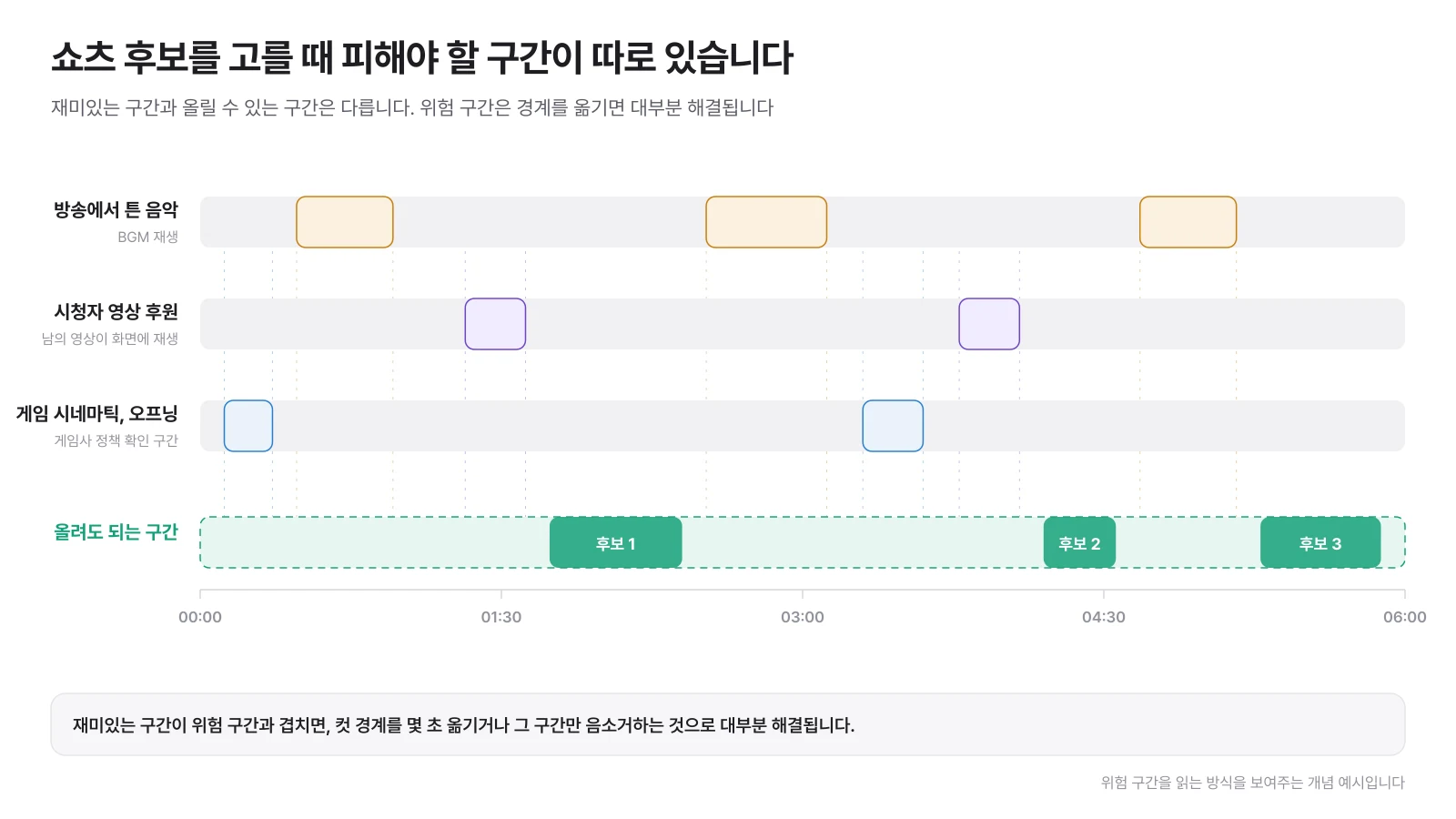
1️⃣ Indication of danger zone: First write down the time when the music was played during the broadcast, the time when the video sponsorship was played, and the time when the game cinematic or opening appeared. If you have sponsorship details and chat logs, you can find the exact time, and if it is a forest, you can use ] how to find a section using star balloon records.
2️⃣ Check whether it overlaps with the candidate: If the shorts candidate section overlaps the risk section, try moving the cut boundary by a few seconds. Most issues can be resolved at this stage, but if that doesn't work, just mute that section.
3️⃣ Check sponsorship and personal information: Verify that the sponsor nickname, sponsorship message, and chat window remain on the screen. Aside from copyright, this is an issue where people's names are stuffed, so it comes up especially often on vertical screens.
4️⃣ Check game company policy: Check the official policy of the game played that day for monetization conditions and prohibited items. If you have decided on your main game, you only need to read it once.
5️⃣ Upload privately and check first: Upload in private or reserved status to check the copyright check results and then make them public. If caught during inspection, the section can be touched up before it is made public. The timing of release and specifications for each platform are separately organized in Shorts Upload Strategy.
The reason this inspection is burdensome is because the replays are usually long. Finding the music and sponsorship sections by hand in a 6-hour broadcast takes longer than editing. ClipSpray leaves a rationale for why a candidate section is included along with the candidate section, so you don't have to go through the timeline all over again to check if it overlaps with a risk section.
What should I do if I receive a claim or warning?
Find out which one it is first, then decide how to respond. Claims and violations have different response paths.
| Situation | What to do first | Options |
|---|---|---|
| Claim Content ID | Check the claimed section and rights holder in YouTube Studio | Delete the section, mute, replace the music, raise an objection if there are grounds |
| Copyright violation warning | Check the rights holder who requested deletion and the target video | Request for withdrawal, 90-day waiting period for expiration, notice of counter-argument if obvious misidentification |
| My broadcast was re-uploaded without permission | Secure the original broadcast date and video URL | Report on the platform, if it is a Naver service Right Protection Center Report |
Objections and counter-notifications are cards that are used only when there are grounds. YouTube informs that if an objection is raised without a valid reason, the rights holder may proceed with a request for deletion. It is much more damaging to get a warning while trying to defend one claim.
Lastly, the Korean Copyright Act includes provisions for citation of published works (Article 28) and fair use of works (Article 35-5). When determining fair use, the purpose and nature of the use, the type and use of the work, the proportion and importance of the used part to the whole, and the impact of the use on the market or value of the work are considered. However, this provision is a standard for later disputes and is not a license to rely on before uploading. In practice, editing to avoid dangerous areas is always cheaper.
Frequently Asked Questions
If I recorded it myself, isn't it my video?
You retain the rights to the recorded and edited portions. However, the games, music, and other people's videos that are included in that screen do not become yours. Most of the problems on YouTube are the latter.
Can I upload the section containing the song played on the broadcast as is?
Music contracts entered into by platforms with trust organizations are conditioned on broadcasting within the platform. The SOOP notice lists cases of use in areas unrelated to the service as reasons for excluding rights. If you are uploading a section to YouTube, it is safer to mute that section or replace it with a sound source that is permitted to be used.
What do I do with the sections where viewer-sponsored videos appear?
Video sponsorship is a function that plays other people's YouTube videos on your broadcast screen. If you cut that section as is, it will be the same as uploading someone else's video. Compose the sponsored video so that it is not visible on the screen, or avoid the sponsored video section, leaving only the reaction.
Do game broadcasts require separate permission from the game company?
Most game companies have public policies for individual creators and allow video posting, advertising, and sponsorship revenue within that scope without separate permission. However, it is recommended to read the official policy document of the main game as it contains prohibited items such as disclosure only to paid subscribers or leaking of unreleased content.
Can I upload viewer-created clips of my broadcast to my YouTube channel?
The official Cizizik guide provides URL sharing and player embedding as methods for sharing clips, and there is no confirmation that re-uploading to external platforms is allowed. If the same scene is needed, it is better to cut it directly from the original replay so that the rights are clearer.
Is it safe if it passes the copyright check before uploading?
No. YouTube also informs you that the copyright inspection results are not final. Inspections only see automatic matching with content registered with Content ID, and manual claims or removal requests may occur after publication.
Source
- Naver Terms of Use (Post Rights)
- Chzzk Customer Center (Information on how to save live video and storage date)
- Chzzk Customer Center (Information on how to use Clip)
- Chzzk Customer Center (how to sponsor a video)
- SOOP Terms of Use (Article 24 Intellectual Property Rights)
- SOOP Notice (Information regarding music copyright)
- YouTube Help Center (Copyright Violation Warning Basics)
- YouTube Help Center (Processing Content ID Claims)
- YouTube Help Center (Shorts Monetization Policy)
- YouTube Help Center (Channel Monetization Policy)
- YouTube Help Center (Video Game and Software Content Policy)
- Riot Games Legal Notice
- Nexon UGC use policy
- PUBG: BATTLEGROUNDS Content Creation Guidelines
- Nintendo Network Service Guidelines
- National Law Information Center (Copyright Law)
Don't miss the moment when my broadcast explodes.
Just enter a replay link and the chat and sponsorship responses will be analyzed to create scenes to be made into shorts. I'll find it for you.
Try it for free with my stream10 vouchers upon signing up · No card registration
Share this post
read together
Creating a reel from a 3-hour broadcast: How to choose 15 seconds to write and move them vertically
2026-08-31 · About 12 min
How to find 30 seconds in a 6-hour broadcast and reduce streamer reel editing time
2026-08-31 · About 10 min
Reasons why editor recruitment is inconsistent, from division of work to unit price and settlement
2026-08-31 · About 12 min
