
Making Chizy Shorts: How to Pick Only the Best Scenes from Long Replays
The thing that takes the most time in making Chzzk Shorts is not subtitles or vertical conversion, but finding scenes to cut from hours-long replays. From the criteria for finding editing points, adding context, 9:16 placement, subtitle rhythm, and titles, we have organized them in order.

ClipSpray Team
 ClipSpray
Key takeaways
- What takes up time in making Tzizy Shorts is not editing skills, but finding scenes to cut from hours-long replays. Once the scene is decided, the remaining steps are completed quickly.
- Tzizyk clips and YouTube shorts are different things. Clip is a function that cuts up to 1 minute from a live video and is consumed within Chzzk, while shorts are content uploaded to YouTube as a vertical video of up to 3 minutes.
- Rather than focusing on the editing point from the beginning, it is faster to check from the point where the three signals - chat speed, sponsorship, and voice change - overlap.
- If you just cut out the funny moments, people who see it for the first time won't understand it. Show the results first and add the 3 to 8 seconds immediately before the incident as context.
- 16:9 Do not place the screen vertically in the center. For game broadcasts, it is better to divide the game and cam into top and bottom, and for low chat, it is better to fill the screen with faces.
It was broadcast for 6 hours from Cizizik. The broadcast ended in a fun way, but the moment I turn on the replay to upload the shorts, I feel at a loss.
So what was the funniest thing about today’s broadcast?
Surprisingly, the thing that takes the longest to make Chzzk Shorts is neither the subtitles nor the vertical screen conversion. It's about finding scenes to cut from hours-long replays.
If you already know the scene you want to edit, cutting and adding subtitles is faster than you think. The problem is the process of finding 30-second candidates in a 4-, 6-, or 10-hour broadcast. This article focuses on the first step and organizes everything in order, from the criteria for finding candidates in replays to cuts, vertical placement, subtitles, and titles.
Tzizik clips and YouTube shorts are different things
First, it is better to distinguish between Czizyk's clips and YouTube shorts. Because the names are similar, they are often used interchangeably, but the way they are made and where they are consumed are different.
In Cizizik, streamers can use the player's scissors button to cut out segments of their broadcasts that allow clip creation. The clips you create can be viewed and shared within Chzzk. It's quite convenient if you remember the scene that just happened while watching the broadcast.
But things change after the live performance ends. If your goal is "I need to find 5 scenes from today's broadcast that would make shorts," you'll end up having to sift through hours of replays.
| Category | Chizizik clip | YouTube Shorts |
|---|---|---|
| Where to make it | Scissor Button for Czizijic Player | Editing program or automatic editing tool |
| Length | Up to 1 minute | Up to 3 minutes |
| ratio | Horizontal as original | 9:16 Vertical or Square |
| Where it is consumed | Cizizik Ahn | YouTube Shorts Feed |
| Prerequisites | Streamer must allow clip creation | Watch the original or replay of your broadcast |
Just looking at the upper limit of the length shows that they are not the same thing.
YouTube classifies videos with a length of 3 minutes or less in a vertical or square ratio as shorts. However, saying that the upper limit is 3 minutes and that it is better to fill 3 minutes are completely different things, and in general, the shorter the broadcast clip, the more advantageous it is.
The scissor button operation method and detour when the clip is blocked in the replay are separately summarized in How to open the clip , so here we will only deal with pulling out the shorts in the replay.
The actual order of long broadcasts becoming shorts
Find an interesting section, cut the front and back, remove any excess parts, fit it to a vertical screen, add subtitles, and decide on a title. To summarize, it looks like this.
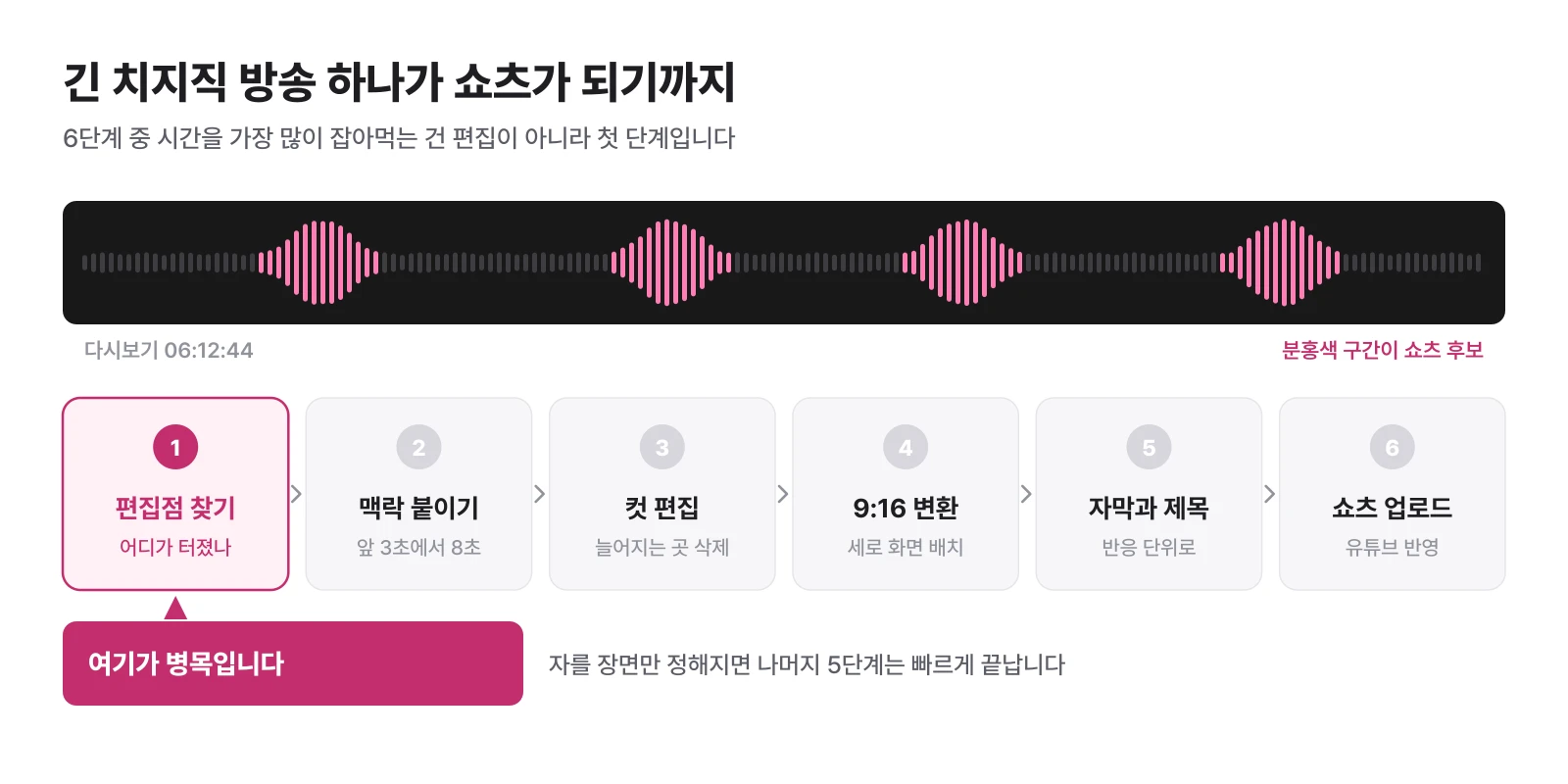
Five of the six steps become faster once you get the hang of them. However, the first stage gets longer as the broadcast goes on. So, for streamers, how quickly they can find a scene to edit is a bigger problem than how well they use an editing program.
1. Find the editing point before making shorts
Just because you're making a 6-hour broadcast into shorts, there's no need to edit all 6 hours. First, you need to narrow down the candidates to about 5 to 10 places.
There is usually a signal for a good explosion. And those signals usually overlap at the same point.
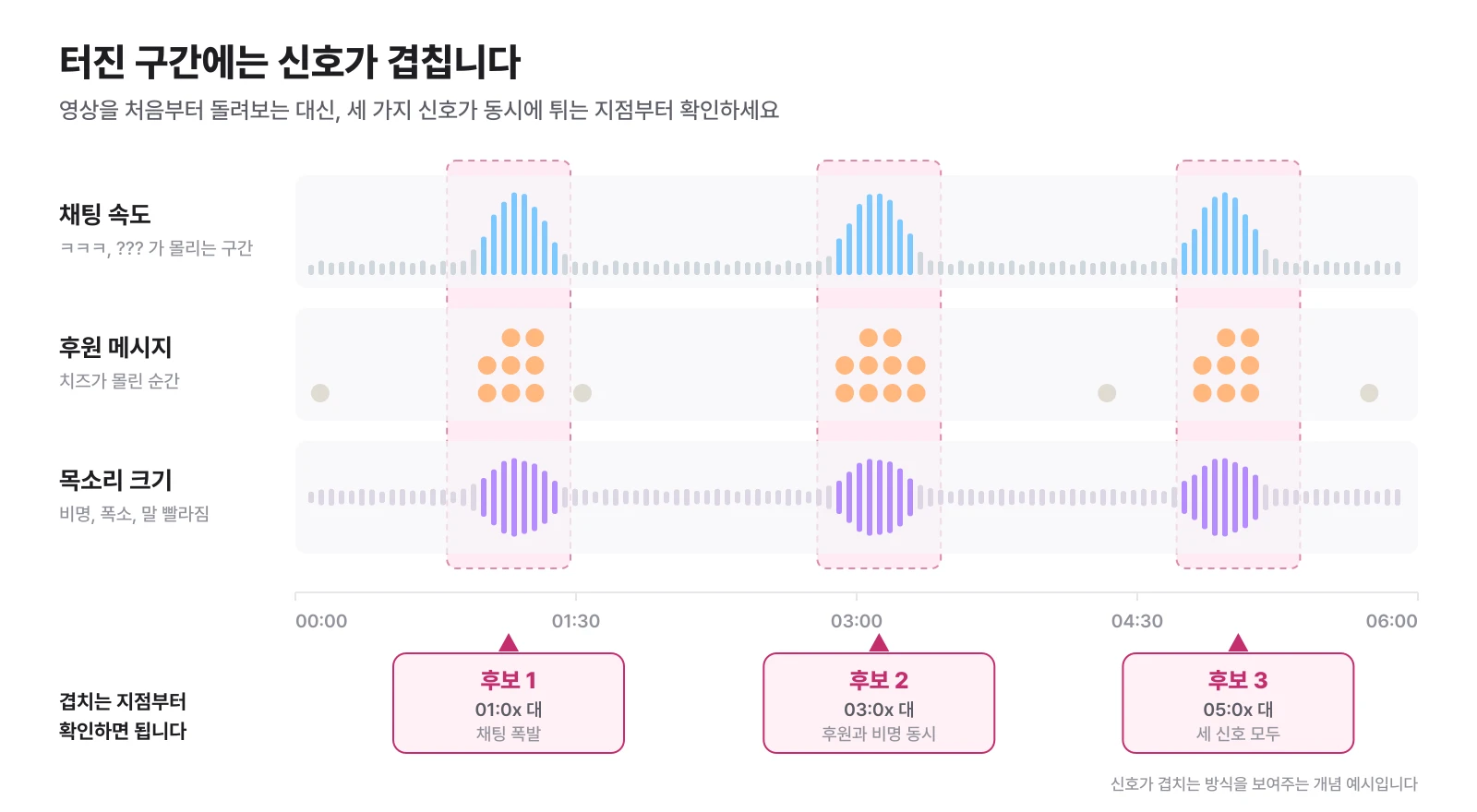
| signal | What do you see | Why Candidate |
|---|---|---|
| Chat Speed | Haha, ???, a section where certain memes or names come up quickly | Meaning that viewers reacted simultaneously |
| The moment when support flocked | Section where cheese or sponsorship messages are focused on a specific scene | The section that responded by spending money |
| Voice change | Sections where you laugh out loud, scream, or speak faster due to embarrassment | The point that surprised the streamer himself first |
| Short before and after of the incident | A scene where the situation is understood within 5 to 10 seconds | Easy to transfer to shorts because you can laugh right away without explanation |
For example, if you've been playing quietly for 4 hours and then the chat suddenly explodes and the streamer screams for 20 seconds, check that section first.
The important thing is not to binge watch the video from the beginning. This step will be much shorter if you write down the timestamp during the broadcast when you're like, "I'll write about this later."
2. Just because you find a good scene, you shouldn’t just cut that part.
When you find a funny moment, you want to just cut it out. But the shorts need at least some context to understand what happened.
If the streamer suddenly shows a scene where he shouts, "Why is this coming here?", existing viewers may laugh, but first-time viewers will not understand. Most of the views on shorts come from outside of your followers.
In this case, it is better to capture the 3 to 8 seconds immediately before the incident.
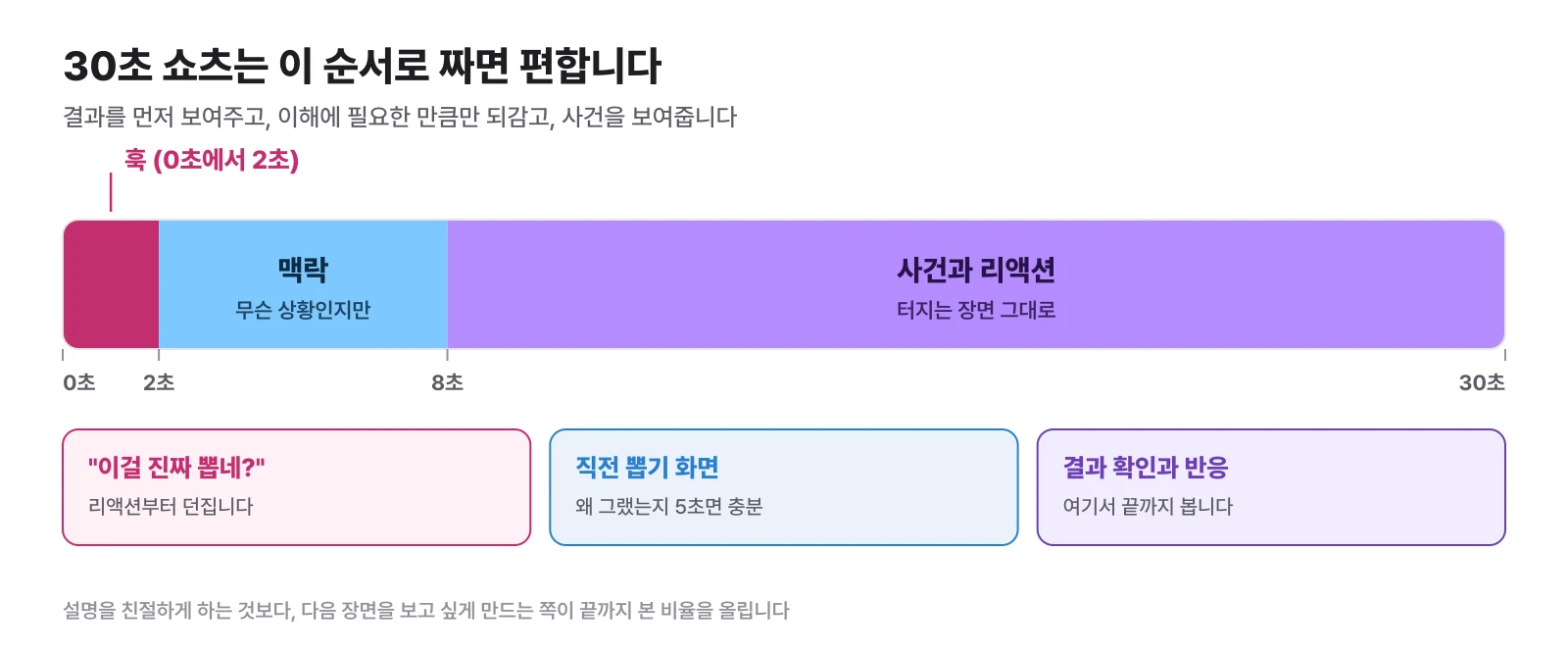
Instead of showing a scene of the game being played from the beginning, it first asks the reaction, “Is there anyone really picking this?” and then immediately returns to the situation a few seconds ago. It shows the results first and rewinds only as much as necessary.
In shorts, making people want to watch the next scene is more important than kind explanations.
3. Do not cut the broadcast screen to 9:16 as is.
Most Czizyk broadcasts are 16:9. Conversely, shorts are consumed vertically on smartphones.
Here, a problem arises if the entire game screen is placed in the vertical center. The game screen gets smaller, the cam gets smaller, and when subtitles are added, it becomes difficult to know where to look.
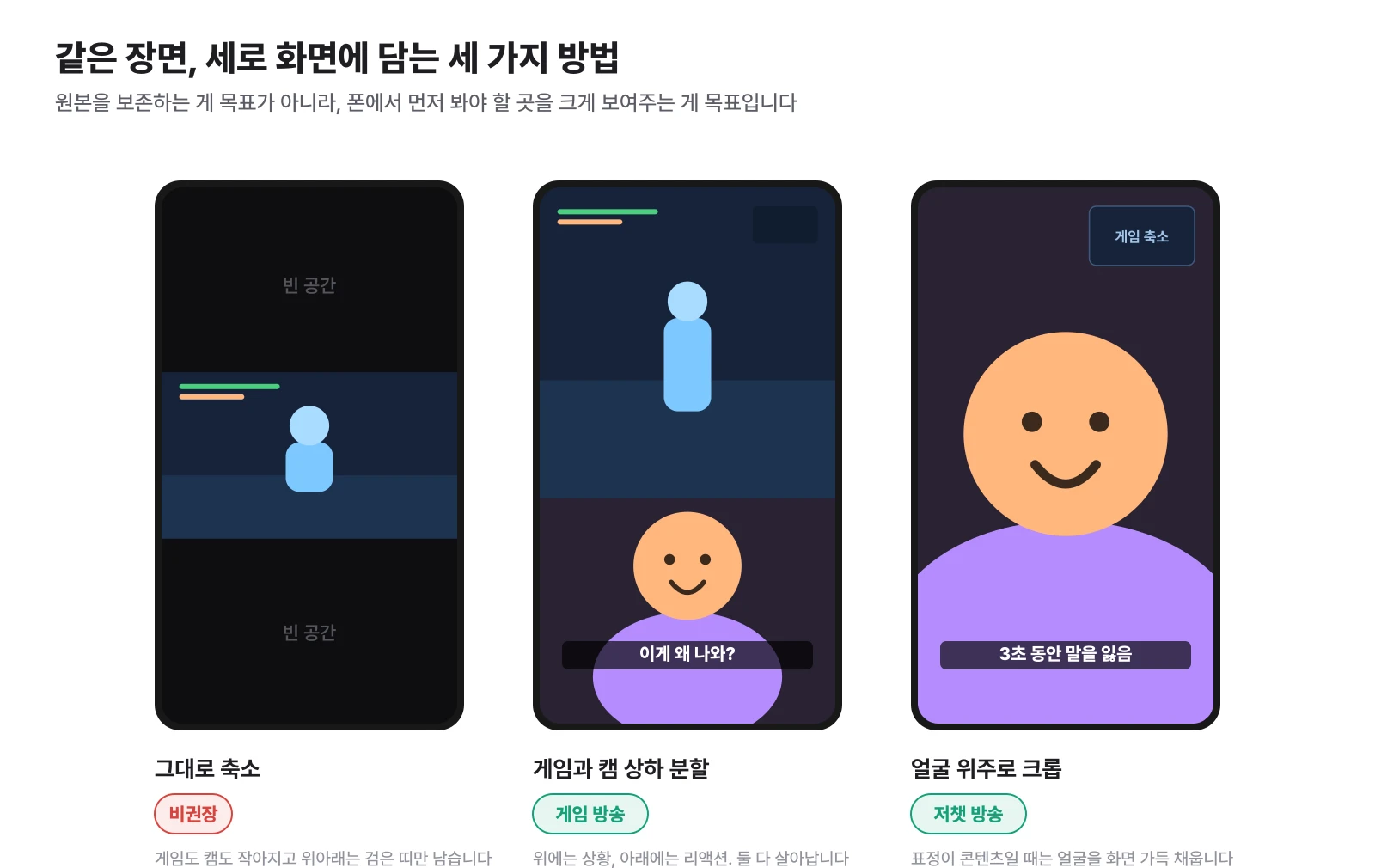
| Broadcast Type | Recommended Placement | Reason |
|---|---|---|
| game broadcast | Game screen on top, cam on bottom | Both situation and reaction come alive |
| Jeochat Broadcast | Crop the face to fill the screen | The expression itself is content, so the bigger it is, the better |
| Reaction, City Hall Broadcast | Focus on the screen you are looking at, make the cam smaller | You must first see what you are reacting to |
There is one key. The goal is not to preserve the original screen, but to show the part you need to see first on mobile in a larger format.
This task becomes much easier if you pre-set the game screen and cam placement at the OBS stage. Detailed settings are summarized in How to split the OBS cam screen.
4. Subtitles are not dictation, but rhythm
If you turn on AI automatic subtitles, everything you say will be displayed on the screen. However, adding subtitles to every word does not make the video better.
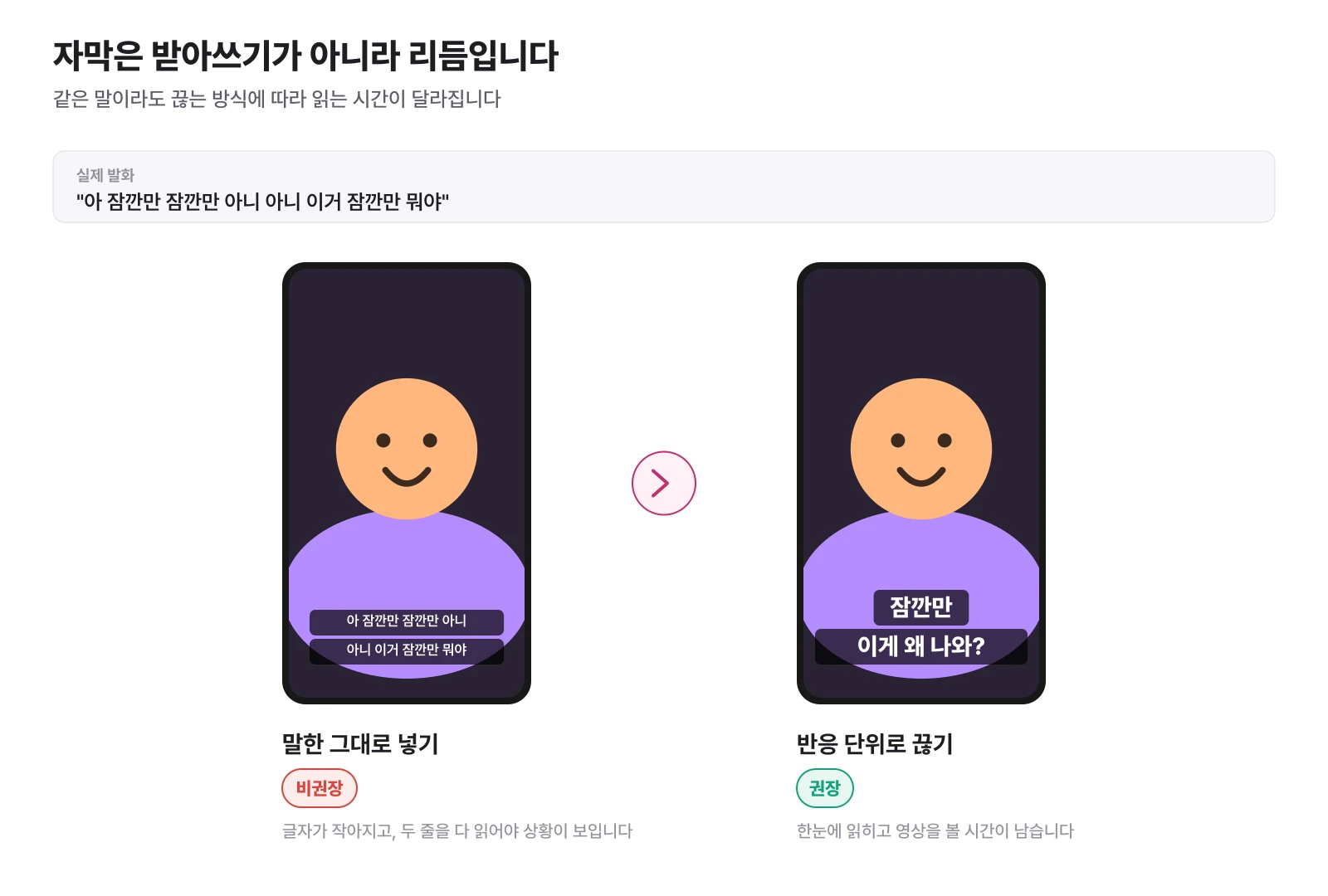
Rather than putting "Oh, wait, wait, wait, no, wait, what is this?" on one line, it is much easier to read if you break it up into responses, such as "Wait a minute," followed by "Why is this coming out?"
Because shorts change screens quickly, the longer they make you read sentences, the less time you spend watching the video itself. You can think of subtitles not as a script but as a device to capture attention.
5. Don’t tell the entire conclusion of the scene in the title
There are many cases where the title leaks even after the clip has been pulled out well. The content is accurate, but the title has no reason to click.
| bland title | A title that makes you curious |
|---|---|
| Funny scenes during gameplay | A viewer said something and the broadcast went off |
| Surprised situation while talking to a viewer | The moment when chatting was more scary than the game |
| Collection of 6-hour broadcast highlights | I can't leave this scene out in a 6-hour broadcast |
| Streamer who made a mistake and was embarrassed | Why a Streamer Was Speechless for 3 Seconds |
For the shorts title, it is better to leave the one thing you are most curious about in the video rather than forcefully repeating the search keyword. It is enough to check this much before uploading.
- Even if someone who has never seen this broadcast reads it, will they be able to picture the situation?
- Didn’t the title already say the most curious part of the video?
- Do the title and screen tell the same story within the first 3 seconds?
- Was the title placed in a location that is not obscured by subtitles or UI?
After uploading, where and how to distribute it is dealt with separately in Where should I upload my shorts to get views? .
The problem is that this is repeated every broadcast.
If you read up to this point, the method of making shorts itself is not difficult. The problem is repetition.
If you're someone who streams once a week, it's worth doing yourself. However, if you are broadcasting for 4 to 8 hours at a time, 3 to 5 times a week, it is a different story. Every time a broadcast ends, you have to open a replay, find editing points, cut out the front and back, remove the protracted parts, create subtitles, and select several candidates.
Eventually, at some point, this thought comes to mind.
I don’t know if they are broadcasting for the purpose of broadcasting or editing.
In long live broadcasts, reducing the work of this first step - finding where the fun is - pays off the most.
What would happen if we narrowed down the candidates by analyzing the entire broadcast first?
ClipSpray is a service created to solve this problem for streamers. When you upload a broadcast file, instead of just scanning a portion of the video, we analyze the entire broadcast flow and use various signals such as chat reactions, sponsorships, voice changes, and screen changes to find candidates for editing points. You can check not only the timeline and recommended sections, but also cut edits, subtitles, and short-form edits in one report.
If you want to make 10 shorts for an 8-hour broadcast, check the candidate scenes first instead of watching the 8-hour video from the beginning. Among them, only those that look good should be reviewed as originals, and only those that are usable should be uploaded.
This changes the person's job from finding interesting scenes from the beginning to choosing which of the selected scenes to post. The difference is much larger than eliminating editing entirely.
When cutting directly and when automatic analysis is correct
Automation is not necessarily the answer. It varies depending on the situation.
| In this situation | This method is fast |
|---|---|
| When you remember exactly the timing of what happened during the broadcast and only need to make one or two | Chzzk clip function or direct cut editing |
| When the scene to be used has already been decided and you want to produce subtitles and effects in detail | Editors like Premiere Pro and CapCut |
| When you don't know what to cut from a multi-hour broadcast | The edit points are first automatically narrowed down and then human-reviewed |
| When broadcasting more than 3 times a week and repeating the same work each time | Automate candidate extraction and focus only on selection |
The third line is key. Changing editing programs won't solve the problem if you don't know what to cut. Especially on platforms where chatting and sponsorship reactions are part of the fun of broadcasting, such as Chzzk or SOOP (Soop), it is more accurate to see viewer reactions rather than just watching the video screen.
In the end, the key is not editing, but selection
It's simple to recap the process of making shorts in a long broadcast. Find funny moments, add minimal context, cut out any excess, adapt to mobile screens, and add subtitles and titles.
But what takes up the most time is the first step: finding where the fun is. The longer the broadcast time, the wider the difference becomes.
If you want to upload shorts consistently, but feel burdened by having to watch replays again, try reducing the time you spend looking for an edit shop before learning more editing skills. In the end, creating a structure that broadcasts as broadcast and doesn't miss the moment that happens is the most important thing in the end if you want to upload consistently.
If you are curious about the replay storage period and backup settings, you can read Summary of Chzzk replays. If you want to look more deeply into the criteria for selecting candidates, you can continue with Broadcast highlight editing and Shorts automatic editing AI].
Frequently Asked Questions
Can I make YouTube shorts using Chzzk replays?
It is possible. Simply extract the section you want to use from a replay or recording file of your broadcast, apply a vertical screen and subtitles, and upload it as YouTube shorts. YouTube classifies videos with a length of 3 minutes or less in a vertical or square ratio as shorts.
Are Tzizyk clips and YouTube shorts the same?
It's different. Chzzk Clip is a function that cuts a specific section of a live broadcast to view and share within Chzzk, and YouTube Shorts are vertical short-form content uploaded to YouTube. Of course, it is possible to use the section held by the clip as shorts material.
How to quickly find edit points in a long broadcast?
Check from the moment the chat suddenly becomes faster, the moment sponsorships gather, or the moment the streamer's voice or reaction changes significantly. The point where the three signals overlap is likely to be the moment of explosion. If it is difficult to check directly, there is also a way to narrow down the candidate section by analyzing reaction data from the entire broadcast.
How many seconds is appropriate for one pair of shorts?
It is better not to try to meet the upper limit. YouTube shorts can be up to 3 minutes long, but broadcast clips can be cut to the minimum length appropriate for the situation, increasing the rate of viewers watching until the end. Reducing the sagging front and back is more important than increasing the length.
Do I have to rewatch the entire show to make the shorts?
It doesn't have to be that way. You can significantly narrow down the range of candidates by taking note of the timestamps during the broadcast, or by first checking the sections with the largest chat and sponsorship response. We also use an automatic analysis tool to first narrow down candidates and then have them inspected by humans.
Is it possible to automatically make cheesy shorts?
It is possible. Using a tool that analyzes the entire long live broadcast to find candidates for editing points and creates cut edits, subtitles, and even short-form edits, the human job changes from finding scenes to selecting them.
Source
Don't miss the moment when my broadcast explodes.
Just enter a replay link and the chat and sponsorship responses will be analyzed to create scenes to be made into shorts. I'll find it for you.
Try it for free with my stream10 vouchers upon signing up · No card registration
Share this post
read together
Creating a reel from a 3-hour broadcast: How to choose 15 seconds to write and move them vertically
2026-08-31 · About 12 min
How to find 30 seconds in a 6-hour broadcast and reduce streamer reel editing time
2026-08-31 · About 10 min
Reasons why editor recruitment is inconsistent, from division of work to unit price and settlement
2026-08-31 · About 12 min
