
Automatic generation of short subtitles: Order to increase recognition rate in broadcast clips
Automatic subtitles are a feature that can be turned on, but they are often incorrect in broadcast clips. We have summarized the limitations of automatic subtitles revealed by YouTube, the points where recognition is broken due to overlapping sounds and proper nouns, how to increase recognition rate by separating audio tracks, and the vertical screen subtitle position and correction order.

ClipSpray Team
 ClipSpray
Key takeaways
- YouTube provides automatic subtitles in more than 90 languages, but it directly states that the quality of each subtitle may vary because it is created using machine learning. Review and editing are the responsibility of the creator.
- There are certain places in broadcast clips where automatic subtitles are broken. Words overlapping with background music, sections where people speak at the same time as if they were joining hands, moments when sound effects and notification sounds explode, and proper nouns that are not in the dictionary.
- The most surefire way to increase recognition is recording, not editing. If you store the microphone, game sounds, and music in different tracks in OBS, you can only include your voice in voice recognition.
- Shorts subtitles cover the top, bottom, and right sides of the app UI. Since the official safe area specifications are not public, it must be placed in the center band based on the space covered by the actual UI.
- The order of proofreading is important. Make a list of proper nouns that are repeatedly incorrect and replace them at once, then correct the break points, and finally save it as a subtitle file to reuse.
Automatic subtitles are now a function that can be done with just one button, but when attached to broadcast clips, they make a lot of mistakes. The cause is generally not the voice recognition performance, but the audio added for recognition. This article first checks the limitations of automatic subtitles revealed by YouTube, and summarizes the points where recognition is broken in broadcast audio and the order of reducing them.
To what extent are automatic subtitles automatic?
YouTube provides automatic subtitles in more than 90 languages, but the quality may vary from subtitle to subtitle, so we directly guide you to review and fix them. The automatic subtitle usage document states, "Because automatic subtitles are generated by a machine learning algorithm, the quality may vary for each subtitle," and goes on to explain that incorrect pronunciation, intonation, dialect, and background noise may cause it to appear different from the actual speech.
The same document also lists conditions under which automatic subtitles will not be created at all.
- Audio processing is still in progress
- If the sound quality is poor or the voice is unintelligible
- If there is long silence at the beginning of the video
- When multiple people are speaking at the same time or multiple languages are mixed
- If the video length is too long
If you read the list again, it has almost all the characteristics of a broadcast replay. Audio with game sounds, a beginning without a greeting, voices overlapping together, and a length of several hours. This explains most of the reasons why automatic captions are underpowered in broadcast clips.
Where are the subtitles broken in the broadcast clip?
Words that overlap with the BGM, sections spoken at the same time, moments when sound effects explode, and proper nouns. These four things account for most of the overall errors, so there are a set of places to fix.
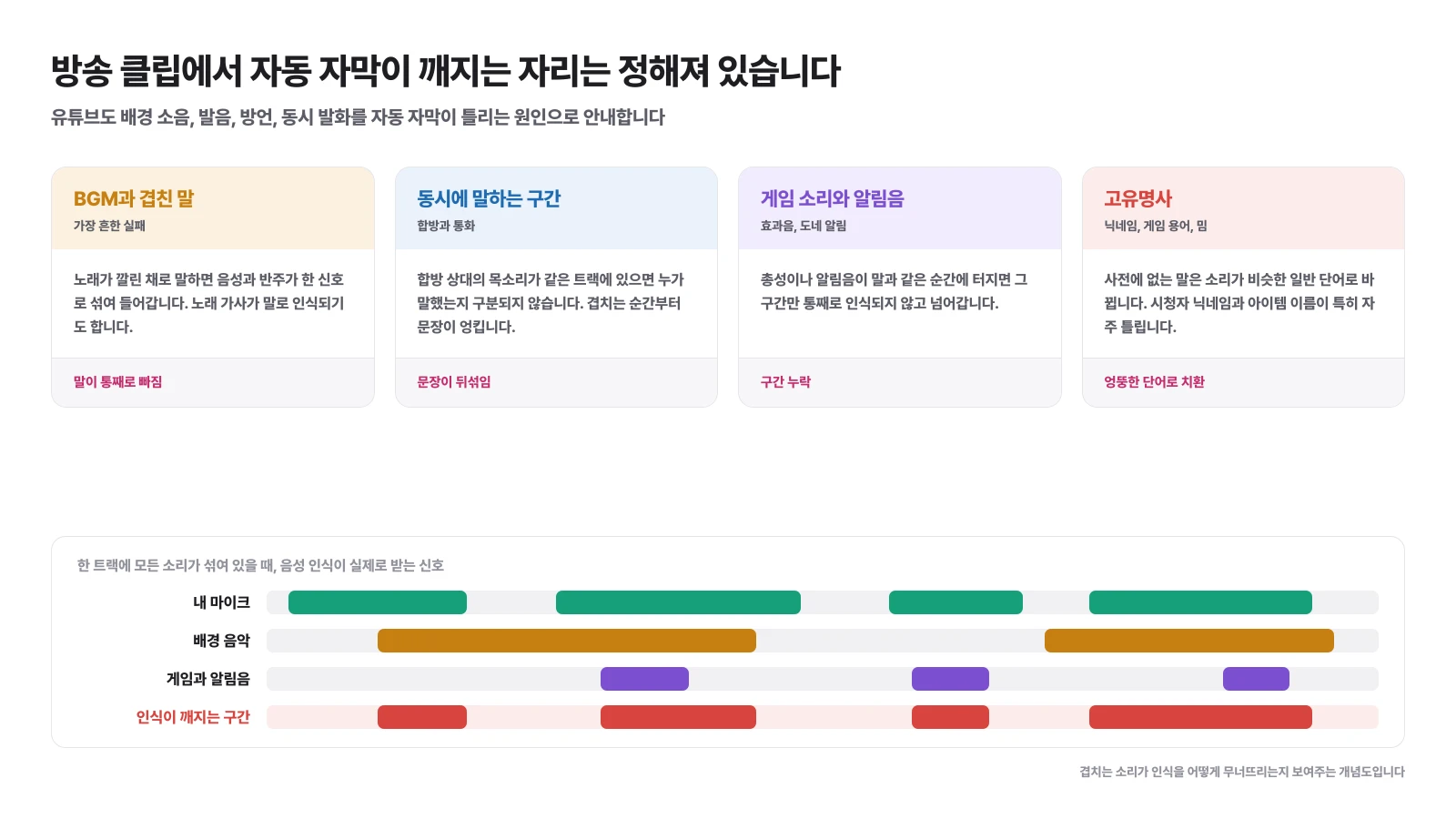
| broken spot | What Happens | Results |
|---|---|---|
| Words overlapping with background music | The voice and accompaniment are mixed into one signal, and the lyrics are sometimes recognized as words. Words are missing entirely | |
| Section speaking at the same time | Hapbang partner and Discord voices are on the same track, so the speakers are not distinguished | Sentences mixed up |
| Game sounds and notification sounds | Gunshots or sponsorship notifications erupt at the same moment as words | Only that section is missing |
| Proper noun | Words that are not in the dictionary are changed into common words with similar sounds | Substitute with an incorrect word |
The first three have the same characteristics. This is a problem caused by overlapping sounds, so there is virtually no way to fix it at the editing stage. This is because it is impossible to restore just the voices from a file that has already been mixed into one. Only the fourth proper noun is a problem that can be solved through post-correction, but since this is repeatedly incorrect, it can be handled all at once.
What is the surest way to increase recognition rate?
Only my voice is included in voice recognition. To do this, you need to split the tracks during the recording stage, not during editing.
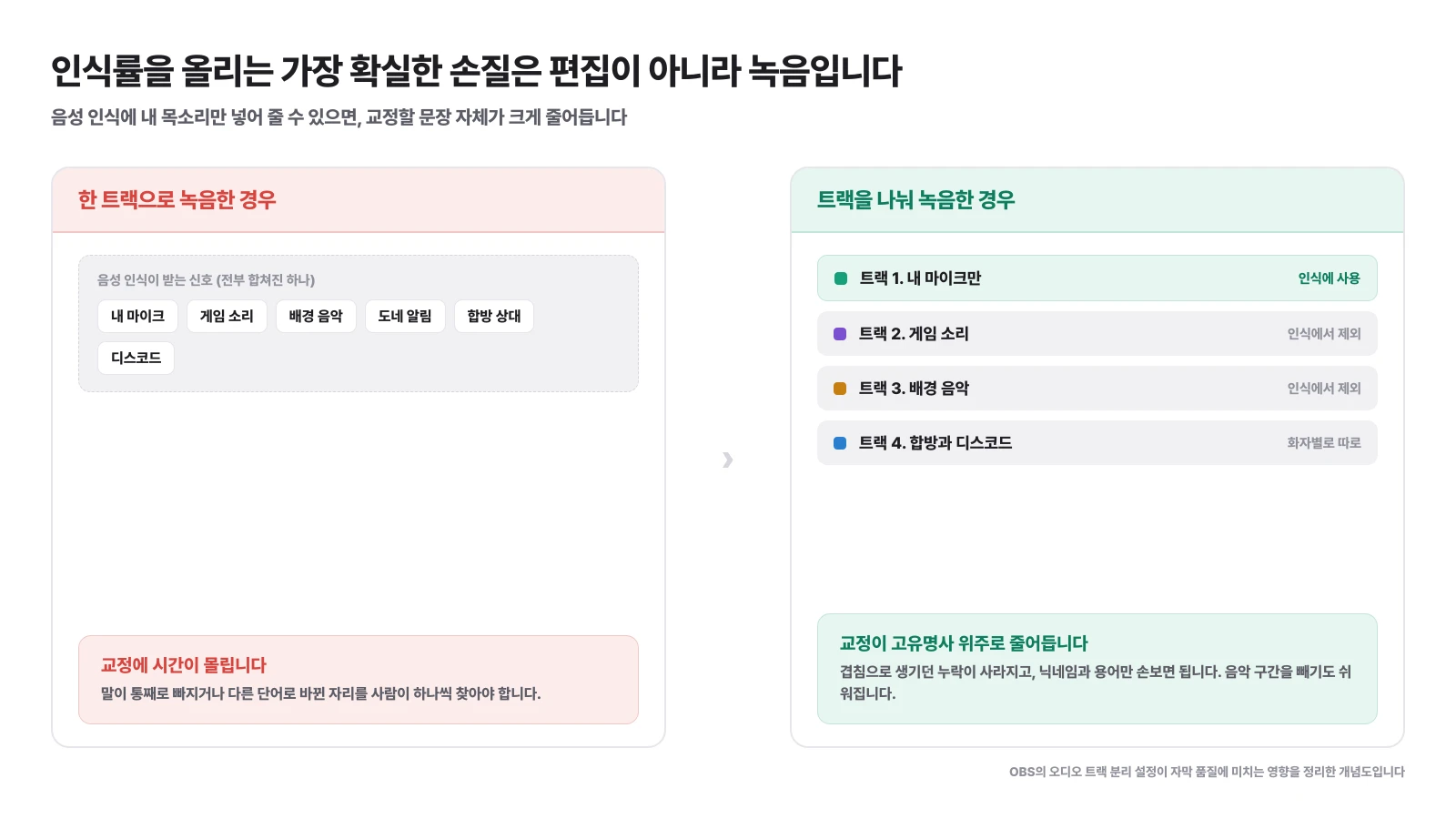
OBS can store microphone, game sounds, music, and notification sounds in separate tracks. If you record like this, when creating subtitles, you can take out only the microphone track and add it for recognition, and omissions that occur due to overlap will disappear. The setup sequence is summarized in How to separate OBS audio.
Track separation solves two problems in addition to subtitles.
- Easier to remove music sections: When uploading to YouTube, problematic sound sources can be removed track by track. Why this is important is covered in Broadcast Replay Copyright.
- Combined editing becomes easier: If the other person's voice is separate, you can create subtitles for each speaker, and it is easy to remove sections that the other person does not want.
If you only have a file that has already been recorded on one track, go ahead and correct the recognition results, but splitting the tracks for the next broadcast is the most time-saving option.**
Where is the best place to create subtitles?
No matter where you create it, the original text comes from the same voice recognition. The difference lies in whether it is easy to proofread and whether the subtitles can be saved as a file.
| path | Under what circumstances | Things to consider |
|---|---|---|
| YouTube automatic subtitles | When you have already uploaded a long form and all you have to do is turn the subtitles on and off | Since it is not baked into the screen, it is not visible to viewers who watch with the sound turned off |
| Upload YouTube subtitle file | When there are already created subtitles | It is stated that automatic synchronization is not suitable for videos longer than an hour or when the sound quality is poor |
| Created in Edit Tools | When you want to bake subtitles onto the screen while making vertical shorts | Since each tool has different recognition engines and proofreading screens, check how proper nouns are processed first. |
YouTube provides three ways to add subtitles: file upload, automatic synchronization, and direct input](https://support.google.com/youtube/answer/2734796?hl=ko). If the material is cut from a longer original, such as a broadcast clip, you will get better results if you cut it to short length and then process it, rather than leaving the entire original to automatic synchronization.
Where should the shorts subtitles be placed on the screen?
The top, bottom and right sides are covered by the app UI. This is why subtitles that are clearly visible on the editing screen are obscured in actual playback.
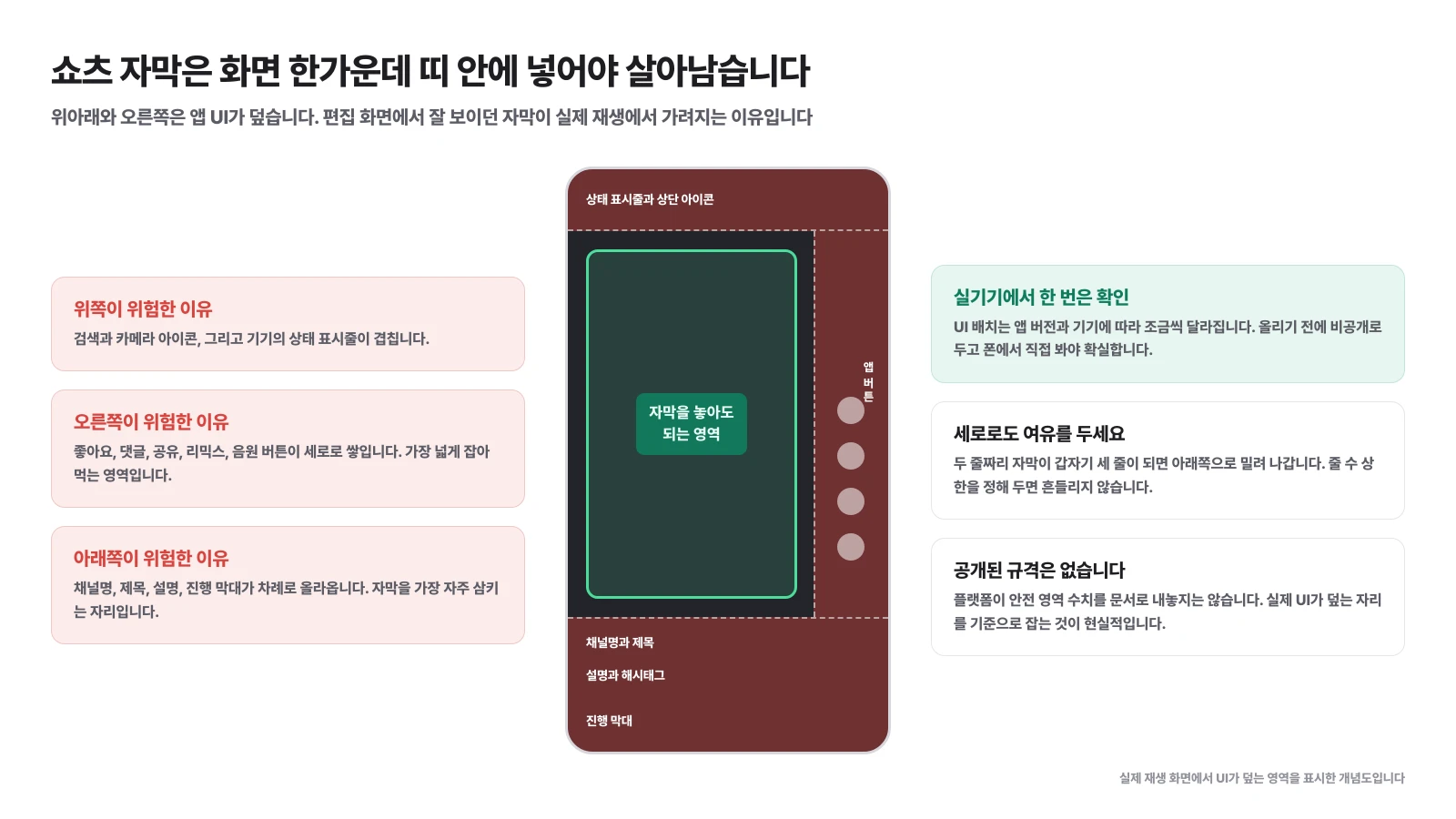
There are three hidden positions. The top is the status bar and top icons, the right is the section where likes, comments, shares, and music buttons are stacked vertically, and the bottom is the area where the channel name, title, description, and progress bar appear in that order. The place where subtitles are most often swallowed is at the bottom. This is because the horizontal image sense that used to habitually place subtitles at the bottom of the screen is transferred over.
The platform does not document safe zone figures. So there is only one realistic standard. Put it in the center band, make it private before uploading, and check it on the actual device. UI layout varies slightly depending on the app version and device.
If you hold on to one more thing here, it won't waver. This is the upper limit on the number of lines that can fit on one screen. If you set it to two lines, the subtitles will not be pushed down and invade the UI area when the sentence becomes longer. Specifications and upload order for each platform are separately organized in Shorts Upload Strategy.
In what order is proofreading done?
The order is to correct repeated mistakes at once and postpone sentence refinement until later. If you start editing sentences from the beginning, an hour will disappear for each clip.
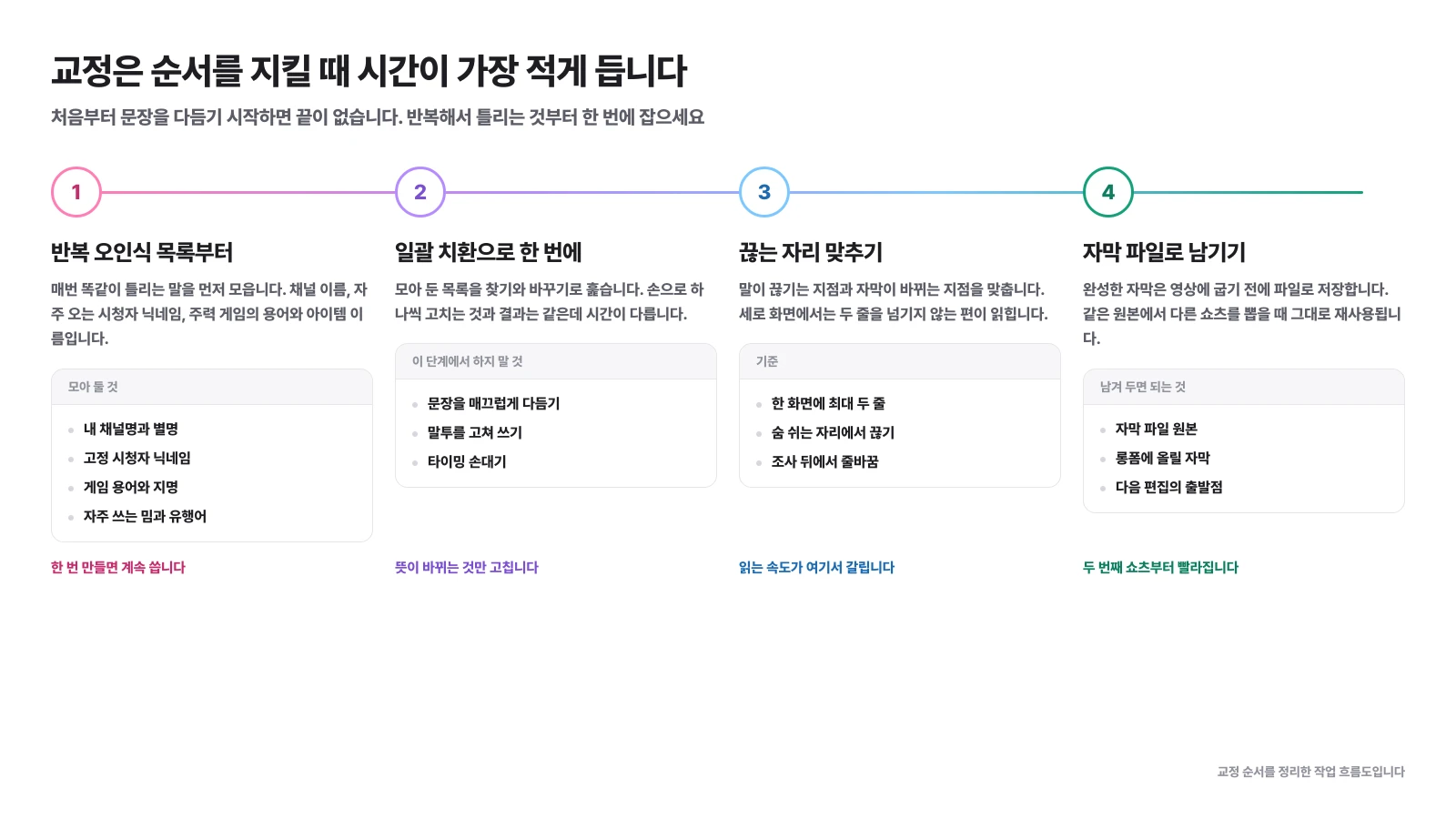
1️⃣ Creating a list of repeated misidentifications: Collect words that are the same incorrectly every time. These are the channel name and nickname, nicknames of frequent viewers, terminology and item names of major games, and frequently used memes. Once created, it continues to be used for the next clip.
2️⃣ Batch replacement to fix at once: Browse through the list with find and replace. At this stage, you only correct changes in meaning and do not refine your speaking style or sentences.
3️⃣ Correct the point where the speech stops: Align the point where the speech breaks and the point where the subtitles change. It is much easier to read if you break off at the first breath and add a line break after the postposition.
4️⃣ Save subtitles as file: Save the completed subtitles as a file before burning them into the video. They are reused when other shorts are pulled from the same original.
If you follow the order, the speed will change noticeably starting from the second clip. This is because the list created in step 1 becomes an asset.
What is the benefit of leaving a separate subtitle file?
When creating multiple episodes from the same source, there is no need to re-recognize, and subtitles to upload to the long form are free.
It's common for one show to feature three or four shorts. If you create new subtitles each time, you will have to change the same proper noun every time. Once you create a subtitle file based on the original, you can cut out only the necessary sections for each short.
It is also used in the long form side. When editing a broadcast replay and uploading it to YouTube, you can replace automatic subtitles by uploading the subtitle file along with it, and YouTube also guides you to give priority to subtitles created by creators. The structure of dividing one broadcast into long form and short form was covered in How to operate YouTube as a streamer.
Is there any way to further reduce subtitle work?
Quickly selecting a section to add subtitles is usually a bigger bottleneck than quickly creating subtitles. It often takes longer to find five candidates for shorts in a 6-hour replay than to proofread the subtitles.
The order is as follows. Divide and record tracks to improve recognition conditions in advance, select a candidate section first, and then add subtitles only to that section. Placing subtitles on the entire screen and then finding a section to use is usually a wasted task.
ClipSpray extracts the candidate section and its rationale from the replay, so you can shorten the step of deciding where to put the subtitle work. If you are curious about the criteria for selecting candidates, they are covered separately in Automatic Shorts Editing AI.
Frequently Asked Questions
Do YouTube automatic subtitles support Korean?
Support. YouTube uses voice recognition technology to provide automatic subtitles in over 90 languages, including Korean. However, YouTube itself informs that automatic subtitles are created using a machine learning algorithm, so the quality may vary for each subtitle, and recommends that creators review and edit them.
Are there cases where automatic subtitles are not created at all?
There is. YouTube indicates that automatic subtitles are not created when audio processing is in progress, the sound quality is poor, the voice cannot be understood, there is long silence at the beginning of the video, multiple people are speaking at the same time, or multiple languages are mixed.
Why are the subtitles so often wrong in broadcast clips?
This is because broadcast audio is a mix of microphone, game sounds, music, and notification sounds in one track. YouTube also cites background noise, pronunciation, intonation, and dialect as reasons why automatic subtitles differ from actual speech. Here, words that are not in the dictionary are added, such as viewer nicknames and game terms.
Where is it safe to place subtitles?
The top icon and status bar overlap at the top of the screen, the like, comment, and share buttons overlap on the right, and the channel name, title, description, and progress bar overlap at the bottom. The platform doesn't document the safe area numbers, so it's better to put it in the middle band and check it on a real device to be sure.
Is it better to burn subtitles into the video or upload them as a subtitle file?
Shorts are often watched with the sound turned off, so subtitles visible on the screen are needed, so it is common to turn them off. However, if you leave the subtitle file as well, you can reuse it when making other shorts with the same original or uploading it to a long form.
Can I upload subtitle files directly to YouTube?
It is possible. YouTube provides file upload, automatic synchronization, and direct input as methods for adding subtitles. However, it is stated that automatic synchronization is not suitable for videos longer than an hour or when the sound quality is poor.
How do you process merged video?
If the other person's voice is on the same track, the speakers become indistinguishable and the sentences become tangled. If Hapbang and Discord voices are separated into separate tracks at the broadcast stage, recognition can be performed for each speaker, greatly reducing the amount of correction.
Source
Don't miss the moment when my broadcast explodes.
Just enter a replay link and the chat and sponsorship responses will be analyzed to create scenes to be made into shorts. I'll find it for you.
Try it for free with my stream10 vouchers upon signing up · No card registration
Share this post
read together
Creating a reel from a 3-hour broadcast: How to choose 15 seconds to write and move them vertically
2026-08-31 · About 12 min

How to find 30 seconds in a 6-hour broadcast and reduce streamer reel editing time
2026-08-31 · About 10 min

Reasons why editor recruitment is inconsistent, from division of work to unit price and settlement
2026-08-31 · About 12 min
