
How to edit a game broadcast: How to select only the scenes to use in a 6-hour replay
The really difficult thing in editing game broadcasts is not reducing 6 hours to 10 minutes, but quickly selecting the 5 hours and 50 minutes to discard. The work order was organized as is, from selection of editing points to rough cuts, separation of long forms and shorts, and subtitles.

ClipSpray Team
 ClipSpray
Key takeaways
- Game broadcast editing is not a task of reducing 6 hours to 10 minutes, but a task of quickly selecting 5 hours and 50 minutes to be discarded. Once the scene to be cut is decided, the rest is done as expected.
- Unlike filmed videos, game broadcasts require the broadcast to end to find out what content was released today. So, content discovery comes first before editing.
- Chat is viewed as a change, not an absolute quantity. The section from the usual 10 channels per minute to 80 is a stronger signal than the section from the usual 100 channels to 120.
- Subtitles and effects are last. It's much cheaper to cut the 12 minutes down to 3 minutes as a rough cut, and if it's still not interesting, throw it away.
- Long forms and shorts come out together at a good editing store. The long form captures the process and narrative, while the short form captures the strongest events and reactions.
We broadcast the game for 6 hours. The YouTube video I want to make is 10 minutes long.
So, is editing a game broadcast a task of reducing 6 hours to 10 minutes? It's a little different. In reality, the hardest thing is to quickly pick out the 5 hours and 50 minutes to throw away out of the 6 hours.
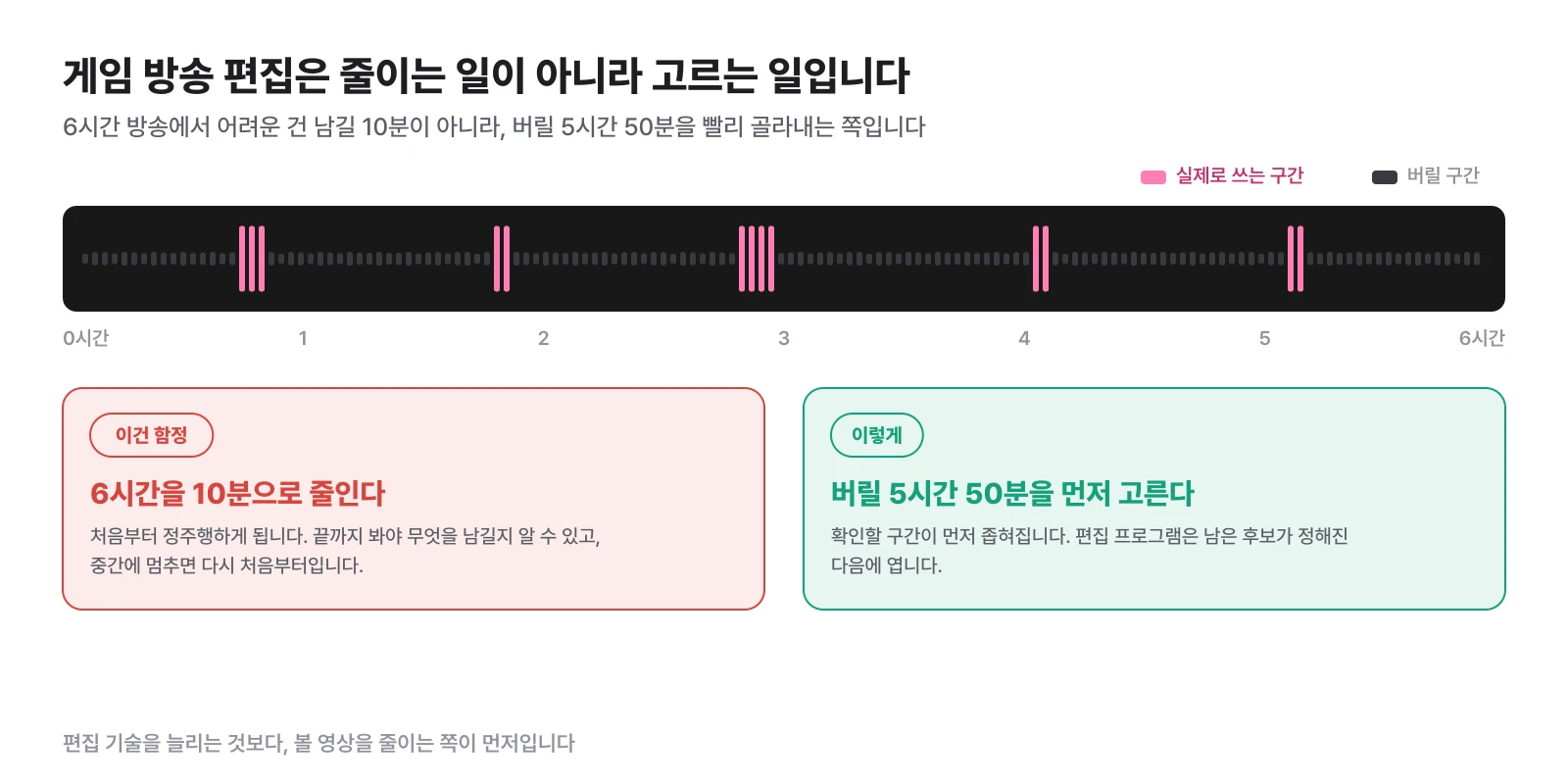
Adding subtitles or sound effects is the next problem. If you don't know where the fun is, no matter how good an editing program you use, you'll end up rewatching it over and over again. This difference is even bigger if you are a streamer who broadcasts for hours on end on Czizyk or SOOP.
Therefore, the work order for editing game broadcasts must be different from that of regular YouTube videos. This article covers that sequence.
Why editing game broadcasts takes so long
Filmed videos usually have a theme before filming. We review new products, introduce five delicious restaurants, and make fried rice in 3 minutes. I know what kind of scene I need and shoot it.
Game broadcasting is the opposite. Only after the broadcast ends will you find out what content was released today.
| Filmed YouTube video | game broadcast | |
|---|---|---|
| When to decide on a topic | Before shooting | After the broadcast |
| Original Length | As needed | 4 to 8 hours |
| Pre-editing stage | Organize as planned | Discovering what content is |
| Throw away rate | low | Most |
You may have played for six hours and only had three really useful incidents. It could have been a crazy play, it could have exploded because of a single comment from a viewer, or it could have turned the situation around with just one sponsorship.
In other words, game broadcast editing is content discovery before video processing. For this reason, playing a replay at 1x speed from the beginning is an editing method that should be most avoided.
Step 1. Before opening a video, we first look for editing point candidates.
Don't press the play button immediately after opening a 6-hour file. First, you need to decide where to start looking.
There are four main signals that can be used.
| signal | What do you see |
|---|---|
| chat surge | A section where reactions such as ㅋㅋㅋ, ???, and crazy gather in a short period of time |
| Focus on sponsorship | A section where multiple viewers reacted to a single situation in succession |
| voice change | Moments when you suddenly laugh, shout, speak faster, or lose speech for a few seconds |
| Marker left by myself | Timestamp recorded during broadcast when judged to be YouTube video |
There is one thing that many people miss here. The point is that chatting should be viewed as a variable amount, not an absolute quantity.
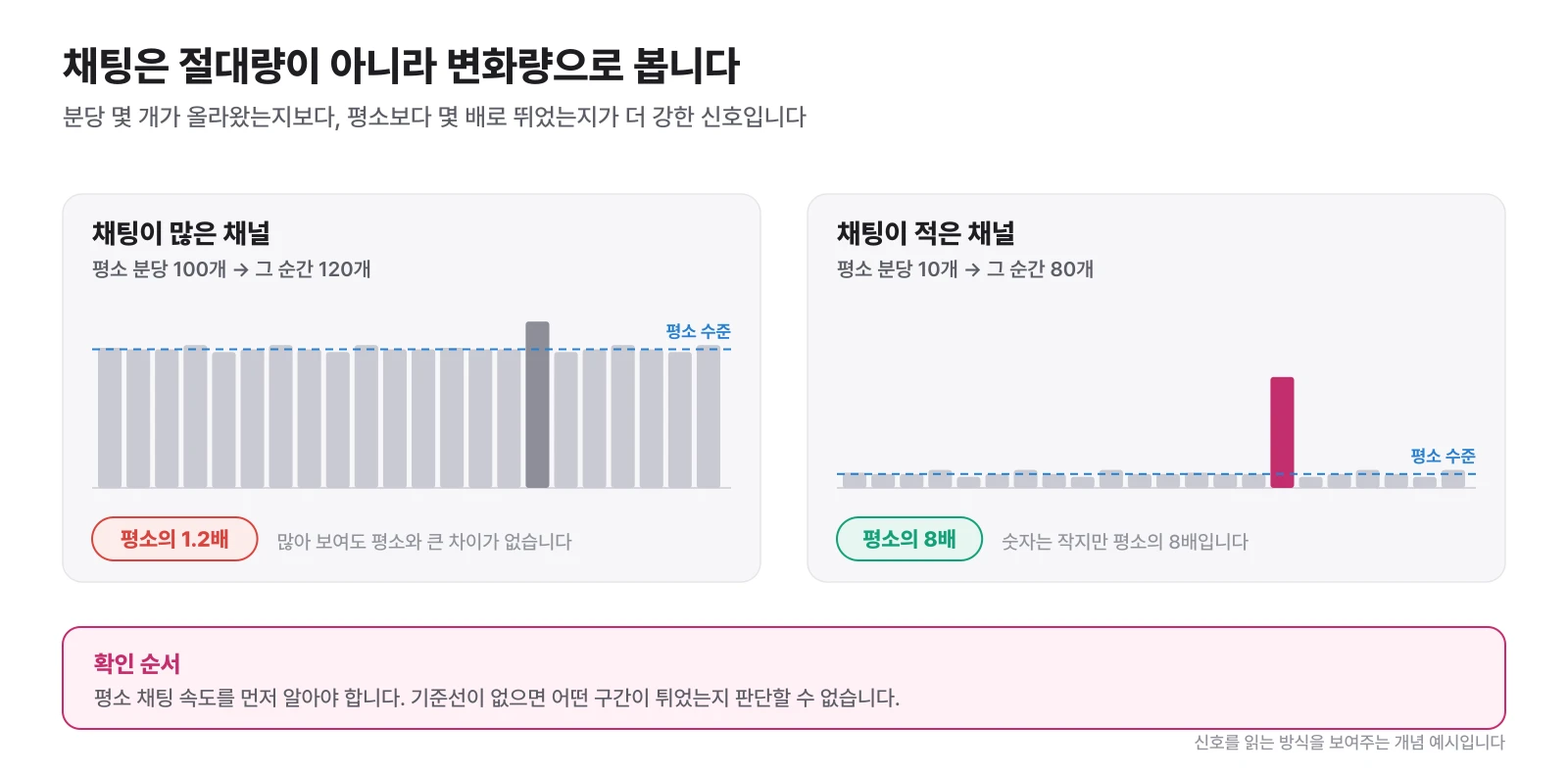
It has a different meaning to go from a broadcast where originally 100 chats were posted per minute to 120, and to go from 10 chats to 80. The latter is a much stronger signal. So, before looking for a candidate, you must first know the usual level of the broadcast. If there is no baseline, it is impossible to determine which section is protruding.
The criteria for determining which section of each signal is the moment when it actually exploded are summarized in more detail in Broadcast Highlight Edit. Here, we will select the candidates and then move on to the task.
Step 2. There is a difference between a good moment and a good video
Mistakes often occur here. As soon as I find a funny moment, I immediately make it into a video.
There are quite a few scenes that were funny on TV, but not funny on YouTube. This is because live viewers already know what’s going on.
Let's say you finally catch a boss that you've been failing at repeatedly for 30 minutes. It's a huge moment for anyone who's been watching. However, someone who only watched the last 30 seconds on YouTube would say, "I caught a boss, why do I like it so much?"
So when you find a candidate, check three things.
- Can someone who sees it for the first time understand the situation?
- Should we wait too long for an event to occur?
- Is the streamer’s character or reaction revealed?
If all three are good, you're a pretty strong candidate. If even one thing is unclear, postpone the ranking later.
Step 3. Instead of adding subtitles, make a rough cut first.
Once you've found 10 candidates, start editing. If you start adding subtitles or looking for sound effects right away, the work time will increase significantly.
The first thing to do is a rough cut.
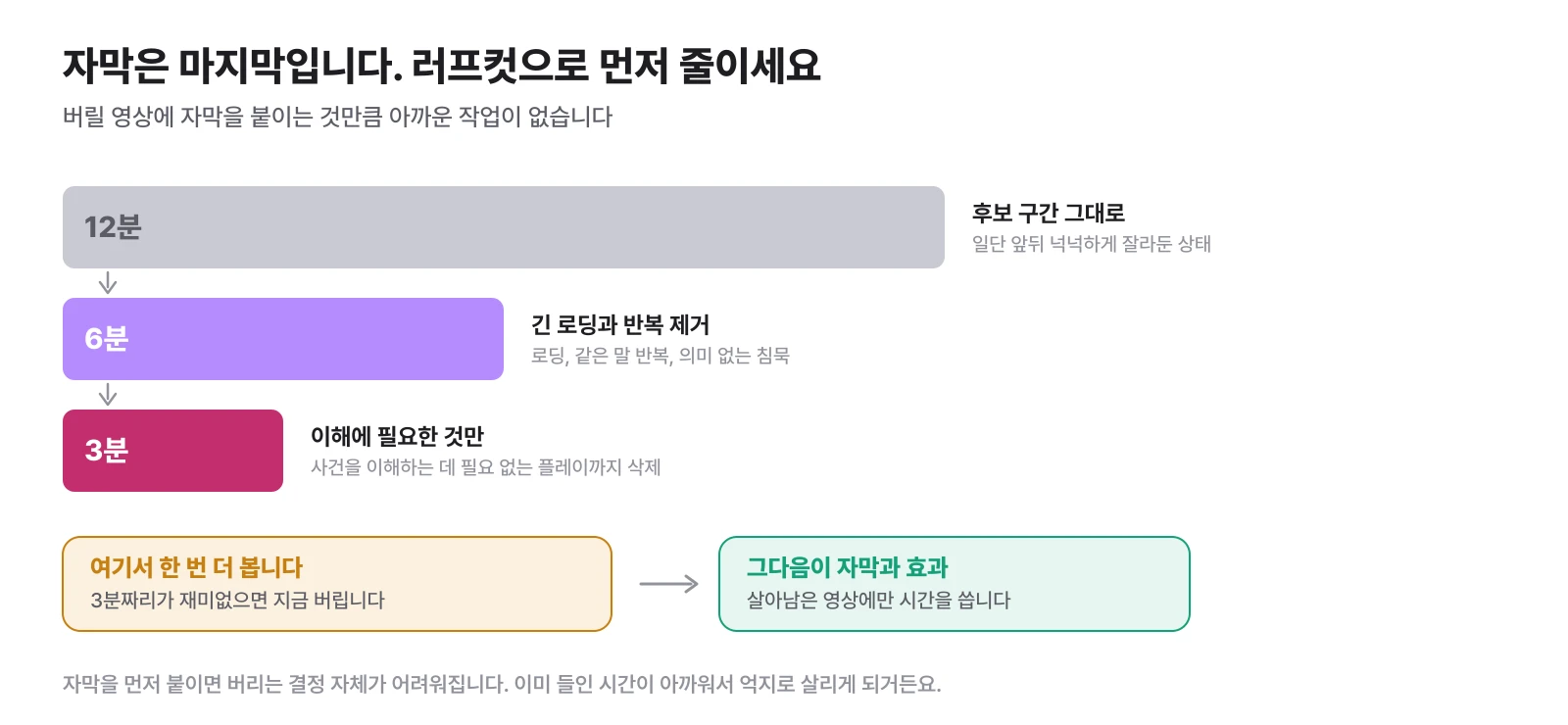
If you have a 12-minute candidate, quickly cut out unnecessary parts from 12 minutes to 6 minutes, or from 6 minutes to 3 minutes. There's no need to make it pretty at all at this stage. Long loading times, repetition of the same words, meaningless silence, unnecessary play to understand events, and parts that repeat explanations that have already been delivered. Take it all out.
Then watch the three minutes again. If it's not fun, leave it here. It's much better than adding subtitles and effects for an hour and then throwing them away.
In fact, what is more important is the psychological part. If you add subtitles first, the decision to discard it becomes difficult. I end up forcing myself to save an uninteresting video because the time I already spent on it is a waste.
Step 4. Long forms and shorts use the same edit points differently.
Once you've found one good scene, you don't have to create just one piece of content.
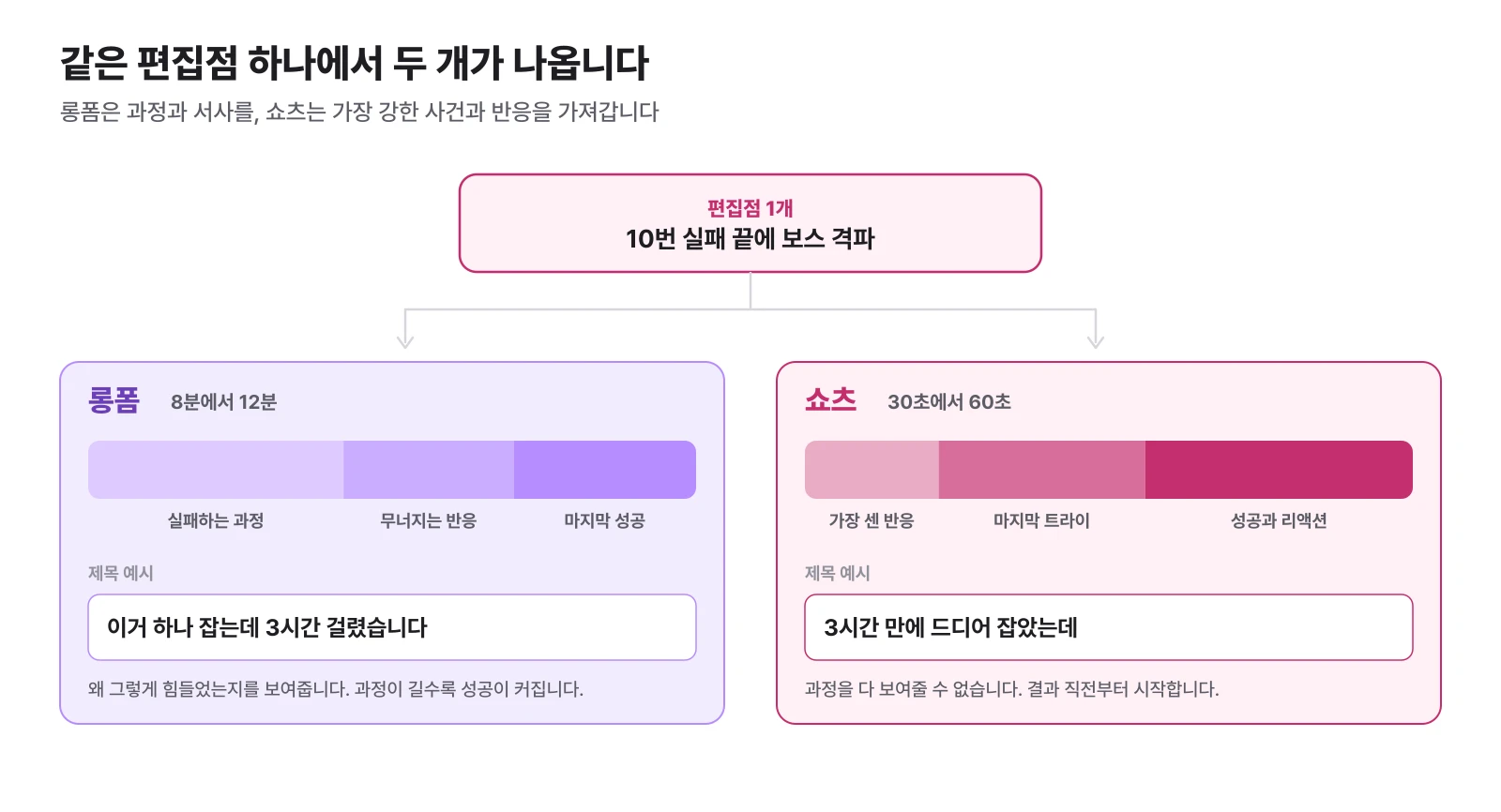
Let's say you failed 10 times in a row and finally found the scene where you captured the boss.
| long form | Shorts | |
|---|---|---|
| Length | 8 to 12 minutes | 30 to 60 seconds |
| starting point | The point where failures begin to pile up | Immediately before the result or the strongest reaction |
| Showing | Process, collapsing reactions, and success | Last try and reaction |
| Title example | It took me 3 hours to catch this one | I finally caught it after 3 hours |
It's the same editing shop, but its role is different. Long forms show process and narrative, while short forms show the strongest events and reactions.
So, when selecting candidates, it is convenient to mark long-form candidates and short-form candidates separately. Because you won't have to look for it again later.
Step 5. Portrait conversion is a screen design issue, not a ratio issue
When making game broadcasts into shorts, there are cases where the original is placed in the center and only the left and right sides are cut out. This will cause the game UI to be cut off and the cam to disappear or become too small.
If gameplay is key, make the game screen bigger, if facial expressions are key, make the cam larger, and if both are needed, split it up or down. It is correct to think of it as creating a new video for a vertical screen rather than forcing 16:9 into 9:16.
Examples of placement and subtitle processing are covered along with screen examples in Making Chzzk Shorts], so please refer to that.
Step 6. The subtitles stop at the same time.
Once the rough cut is finished, we start working on the subtitles. In game broadcasts, you don't need to dictate every word.
If a streamer says, “No, wait, wait, no, why does this come out here?”, it would be natural to break it up into “Wait a minute” followed by “Why does this come out here?” rather than just putting it in one sentence.
The role of subtitles is not to record audio, but to ensure that you do not miss the most important words. For the same reason, meaningless additions and repetitive words can be drastically reduced.
Choose an editing program according to the bottleneck
There is no right answer in editing programs. Instead, looking at what your bottleneck is narrows down the answer.
| The point where I'm stuck now | fit tools |
|---|---|
| Detailed cuts, subtitles, effects, and plug-ins are required | Premiere Pro |
| I want to start editing properly without paying | DaVinci Resolve |
| I want to quickly pull on short shorts and use automatic subtitles | CapCut |
| I don't know what to cut | Automate edit point navigation first |
The last line is the point of this article. If the problem is not “how to edit,” but “what on earth to edit in a 6-hour broadcast?”, that time will remain the same even if you change the editing program.
ClipSpray is a service created to reduce this front end. By analyzing entire long broadcasts such as Chzzk and SOOP, we first narrow down candidates for editing points by looking at chat, sponsorship, voice, and screen flow together. Rather than replacing Premiere or CapCut, it's more about reducing the work you have to do before opening those programs.
The accuracy of automatic subtitles and automatic cuts by tool, and the actual difference between free and paid tools, were compared separately in AI video editing program .
If it’s a 6-hour broadcast, try doing it in this order
The most inefficient method is one that starts with constant driving and returns to constant driving.
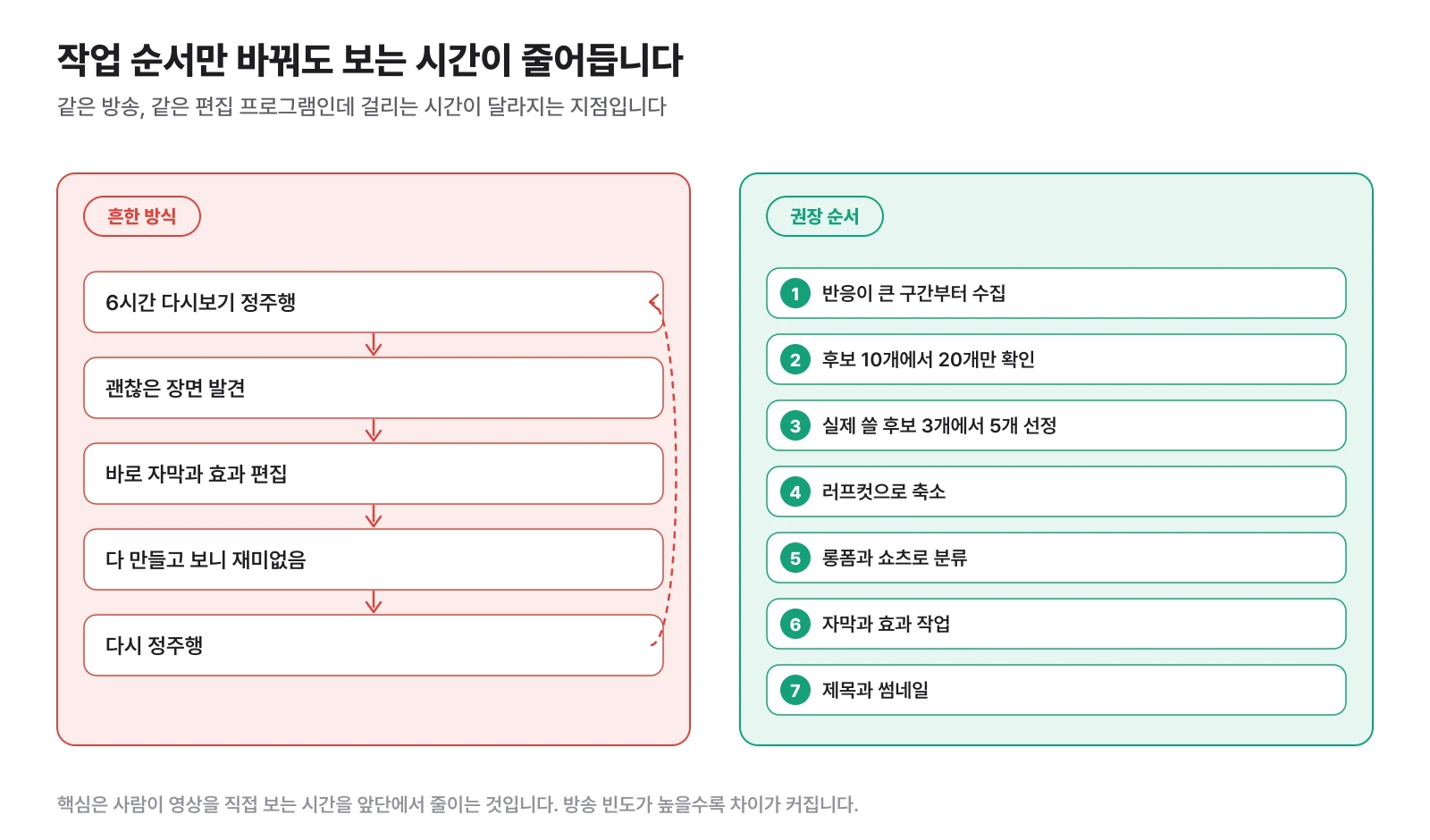
Just changing the order significantly reduces the time a person spends directly watching the video. The higher the broadcast frequency, the bigger the difference. If you broadcast 4 times a week, this difference increases in hours per week.
The four biggest wastes of time in game broadcast editing
Watching the replay from the beginning. It's the biggest waste. Find candidates for editing stores first.
Editing each candidate to a high level of perfection. If you add subtitles and effects before deciding whether to use them as content, you end up with a lot of wasted work. The rough cut always comes first.
Trying to save every scene. A scene that is funny on air is different from a scene that is funny on YouTube. You have to boldly throw it away to buy what’s left.
Find long forms and shorts separately. Check first whether both formats can be sold together at a good editing store.
In the end, it's more about editing than editing skills.
If you memorize one more shortcut, you can cut a single cut a few seconds faster. However, if you first remove the 5 hours you don't need to watch from a 6-hour broadcast, you will save several hours. If you edit frequently, this is the first place to optimize.
What to cut. Next is How to cut it.
How to divide the results from a single broadcast into long forms, shorts, and clips is explained in How to operate YouTube as a streamer], and for information on where and how to post the completed clips, see Where should I upload my shorts to get views? .
Frequently Asked Questions
Where should I start editing game broadcasts?
It is better to start with selecting editing points rather than video effects or subtitles. Use chat reactions, sponsorships, streamer voice changes, and markers left during the broadcast to first narrow down the section you want to check throughout the broadcast, then open the editing program.
Do I have to watch the entire 6-hour broadcast to edit it?
That's not true. By using data such as chat volume changes, sponsorship records, voice changes, and on-air markers, you can narrow down the sections to check first to 10 to 20. Permanent navigation is the most expensive navigation method.
What are the best game broadcast editing programs?
It depends on where the bottleneck is. Premiere Pro or DaVinci Resolve are convenient for detailed long-form editing, and CapCut is convenient for quick short-form production. However, if finding the scene to cut itself is a bottleneck, changing the editor will not reduce the time.
Can I make shorts in one game broadcast?
It is possible. Among the events to be written in long form, select sections with short context and strong reactions and re-edit them in vertical form. The work goes much faster if you mark the long-form and short-form candidates separately from the beginning.
To what extent should I reduce the rough cut?
Rather than setting a length goal, use less as a standard. If you remove long loading, repetition of the same words, meaningless silence, and play that is not necessary to understand the events, it will generally be reduced to about a quarter of the original length. If it's not fun in that state, then I throw it away.
Can AI automate game broadcast editing?
You can automate not only automatic subtitles, cut detection, and vertical screen conversion, but also the process of selecting candidate scenes from long broadcasts. However, it is better to have someone review the scene to see if it matches your channel.
Source
Don't miss the moment when my broadcast explodes.
Just enter a replay link and the chat and sponsorship responses will be analyzed to create scenes to be made into shorts. I'll find it for you.
Try it for free with my stream10 vouchers upon signing up · No card registration
Share this post
read together
Creating a reel from a 3-hour broadcast: How to choose 15 seconds to write and move them vertically
2026-08-31 · About 12 min
How to find 30 seconds in a 6-hour broadcast and reduce streamer reel editing time
2026-08-31 · About 10 min
Reasons why editor recruitment is inconsistent, from division of work to unit price and settlement
2026-08-31 · About 12 min
