
Chzzk VOD download: Check the path where you leave the original version of your broadcast and when it doesn't work
There is no information about the replay download function at the Chzzk Customer Center, and SOOP can be downloaded directly from the VOD player. From the differences in the official paths between the two platforms, local recording settings during broadcasting, diagnosis by symptom when downloading is blocked, and calculation of original capacity.

ClipSpray Team
 ClipSpray
Key takeaways
- There is no explanation about the download function in the Chzzk Customer Center's replay guide document. Instructions for using Clips only provide URL sharing and player embedding as sharing methods.
- The forest has official paths. You can download from the More (3dot) button on the VOD player, and you are also instructed to download the storage policy change notice in advance if necessary.
- The most obvious route is OBS local recording during broadcast. Streaming and recording are separate buttons, so they can be turned on at the same time, and files created this way are not affected by platform storage policies.
- If you change tools first when downloading doesn't work, you're wasting time. If there are no videos in the list or there is an age restriction, it is a platform setting issue and cannot be resolved by replacing the tool.
- Based on the 1080p 60fps commercial section of 8,000 kbps, one 6-hour broadcast is approximately 21GB. Rather than keeping everything, it is more realistic to cut out only the sections that will be used.
Even though I receive my own broadcast, the route is different for each platform. Soop can be downloaded directly from the VOD player, and Chizizik cannot find any information about the download function in the customer service center document. This article checks the official paths for both platforms and organizes when to leave the original and the order to check when the download is blocked. I wrote this based on the situation where I was backing up my broadcast.
Does Chizijic provide an official download function?
There is no explanation about downloading in the Guidance on how to save live video and storage date] at the Chizijic Customer Center. The scope of that document is whether to create a replay, select a publishing method, and edit video information and change privacy settings in the studio's content management.
Clip usage guide is the same. The clip sharing method only provides instructions for sharing URLs and embedding players, but there is no path to downloading files in the document.
Just because it isn't confirmed doesn't mean it isn't there. Since features are sometimes added without notice, it is best to take a quick look at the studio screen. However, since features not specified in the documentation may change at any time, it is safer not to rely solely on them to create a backup plan.
How do I get SOOP?
Just click the More (3dot) button in the VOD player to proceed with the download. This is the path provided directly by SOOP in Storage Policy Change Notice.
There is one more sentence to pay attention to in the same notice. After explaining the changes, he wrote, "If necessary, we would like to ask you to download the VOD replay in advance." In the FAQ, it is also repeated that it may be deleted if it does not meet the policy standards, so please download it in advance. The fact that the platform recommends direct backup should be read as meaning that you should not leave storage to the platform.
How the forest's storage period has changed and when my video is subject to deletion is covered by grade in Summary of Replay Storage Period .
When should I obtain the original?
It's safest before the broadcast ends, and there's nothing you can do after it expires. If you think of downloading as an afterthought, your options keep shrinking.
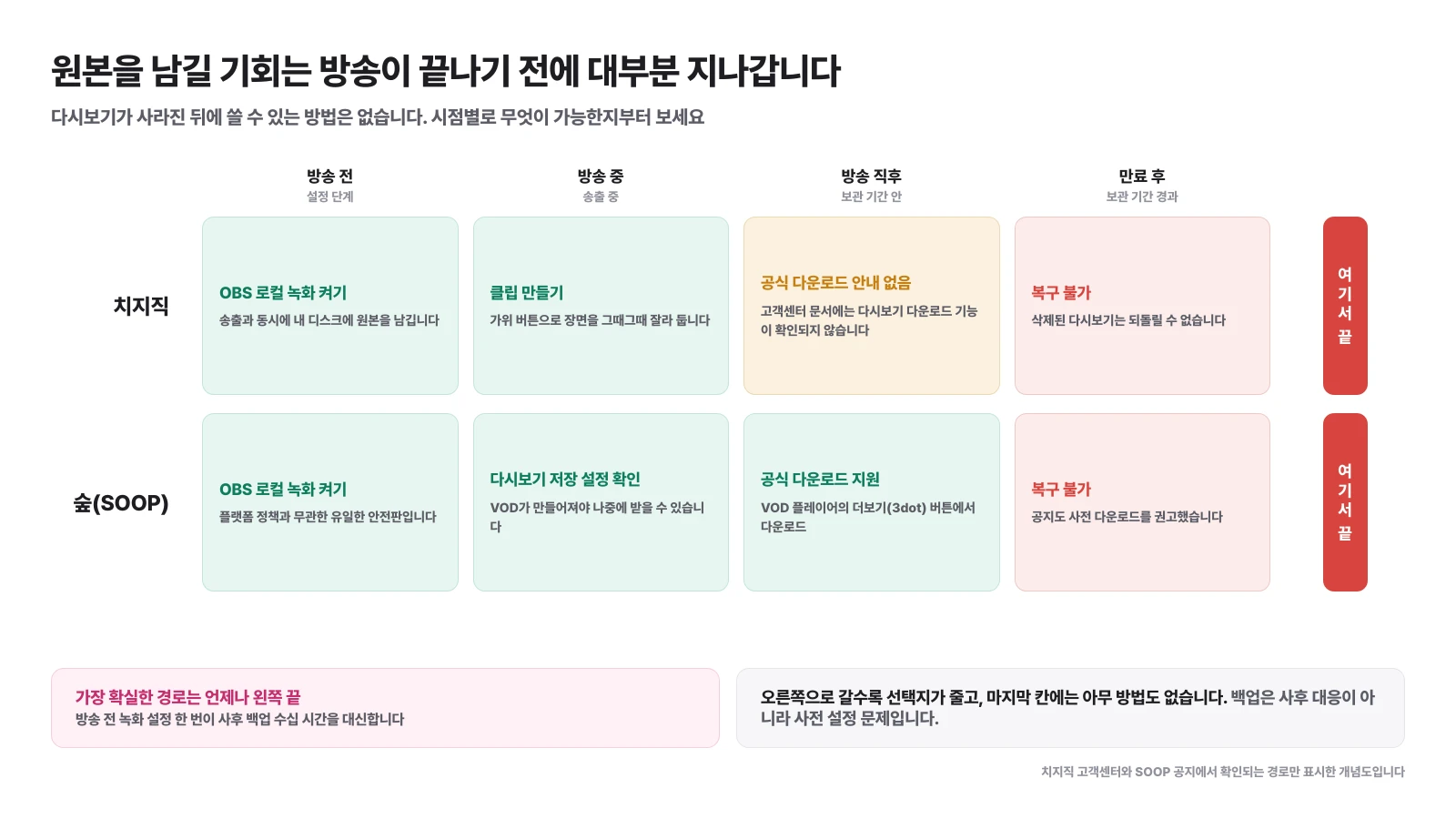
| point of view | Chizijic | SOOP |
|---|---|---|
| Before broadcast | OBS local recording settings | OBS local recording settings |
| On air | Securing Scenes by Creating Clips | Check replay save settings |
| Immediately after broadcast | No official download instructions | Download from VOD Player |
| After expiration | No recovery | No recovery |
The last line of the table is the conclusion of this article. Deleted replays cannot be restored, so the options decrease as you move to the right and nothing remains at the end.
Why is local recording the best option for broadcasting?
OBS' broadcasting and recording are separate buttons, so they can be turned on at the same time, and files created this way are not affected by the platform storage policy.
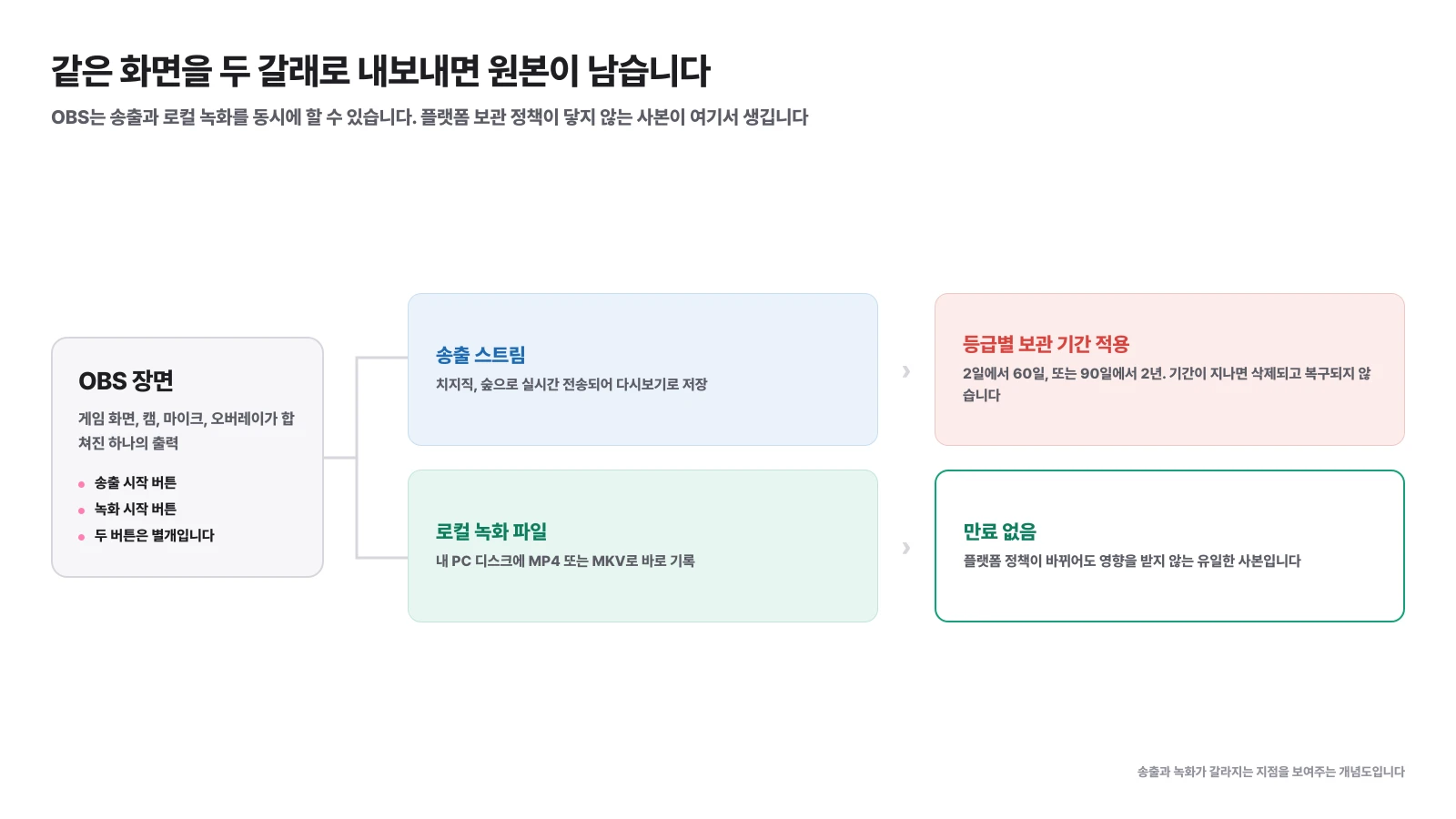
The same scene splits into two parts. One side goes up to the platform and follows the graded retention period, and the other side writes straight to my disk. There is no expiration date on the back.
1️⃣ Set recording path and format: Specify the folder and format where the recorded file will be saved in the output section of settings. MKV is safe for long-term broadcasting because the file survives even if the program is turned off during broadcasting, and can be rewrapped as MP4 before editing.
2️⃣ Determining the recording quality: You can set it independently from the transmission quality. If you have editing in mind, it is better to set the bit rate higher than the transmission, and if capacity is a burden, set it the same as the transmission.
3️⃣ Split audio track: If you store the microphone, game sounds, and music in separate tracks, you can later remove only the music or use only the voice for subtitle recognition. The settings are in How to disconnect OBS audio.
4️⃣ Turn on recording when broadcast starts: You must press both buttons separately. If you often forget things, put them on your checklist before you start broadcasting.
If it is difficult to record every time because there is not enough disk space, it is better to turn it on at least for the episodes that cannot be recreated. The same scene cannot be filmed again for joint broadcasts or event broadcasts.
What should I check first when downloading does not work?
If you divide the symptoms first, you will immediately be able to determine whether or not the problem requires a tool change. If there is no video in the list or there is an age restriction, the result will be the same no matter what you use.
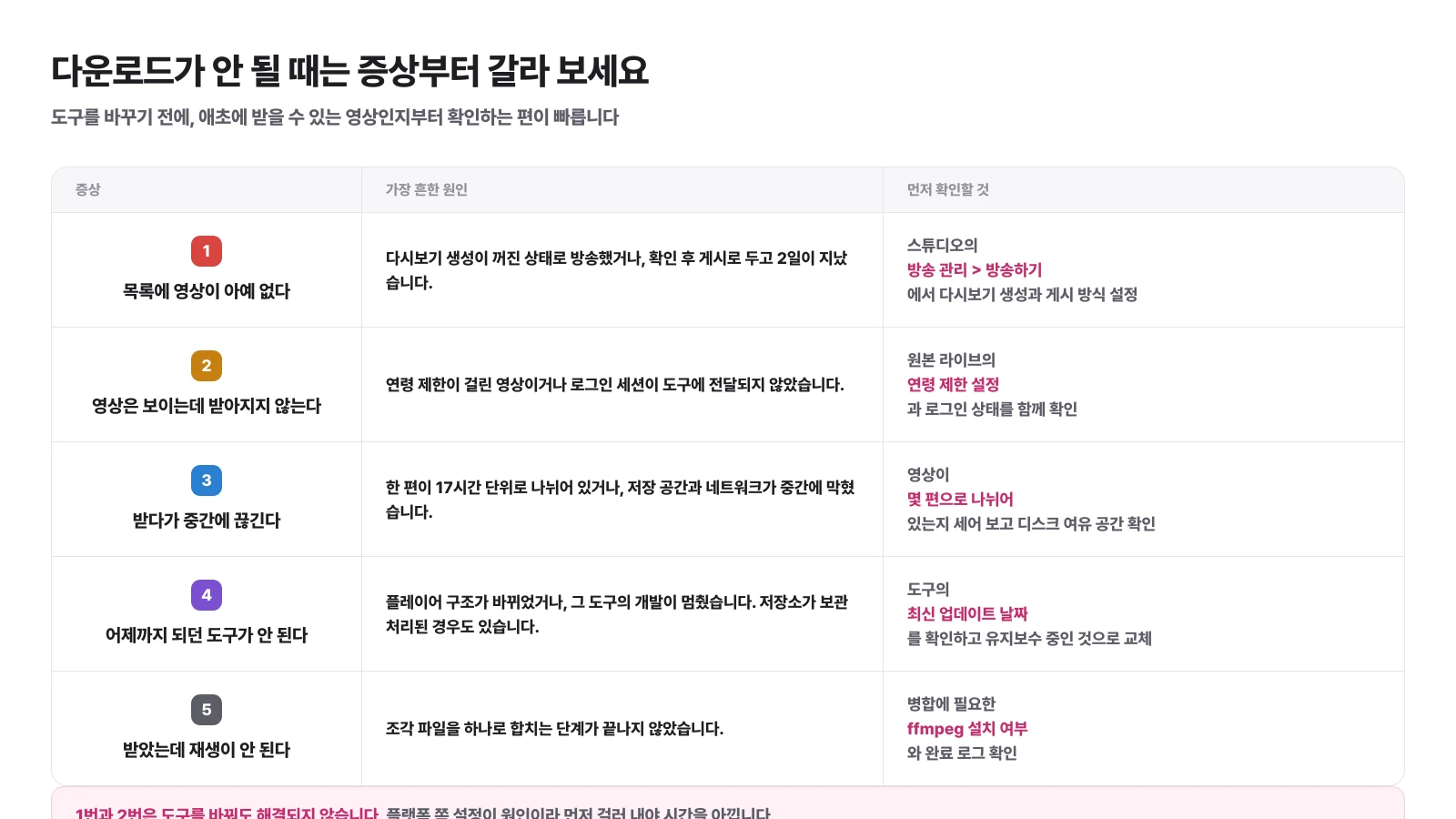
| Symptoms | Common Causes | Check first |
|---|---|---|
| There are no videos in the list | Replay creation is turned off or two days have passed without posting | Setting up replay creation and posting methods in the studio's broadcast management |
| The video is visible but not received | Age-restricted video or login status not delivered | Age limit settings and login status for Original Live |
| It cuts off in the middle of receiving | There are multiple episodes divided into 17 hour units, or storage space and network are blocked | How many parts is the video divided into? Free disk space |
| The tools that worked until yesterday no longer work | Either the player structure has changed or the development of the tool has stopped | The tool's latest update date and maintenance status |
| I received it but it doesn't play | Merging fragment files is not finished | Whether ffmpeg is installed and its completion log |
There is one thing to keep in mind when using third-party tools. Tools in this area are often out of maintenance. Platforms stop working when players change, and repositories become archived when developers step away. It is not uncommon for what was used yesterday to not work today, so it is better not to entrust important tasks to just that one tool.
Once I receive all the originals, how much does it take?
You only need to know the bitrate and time to calculate. 6 hours of recording at 8,000 kbps is approximately 21GB.
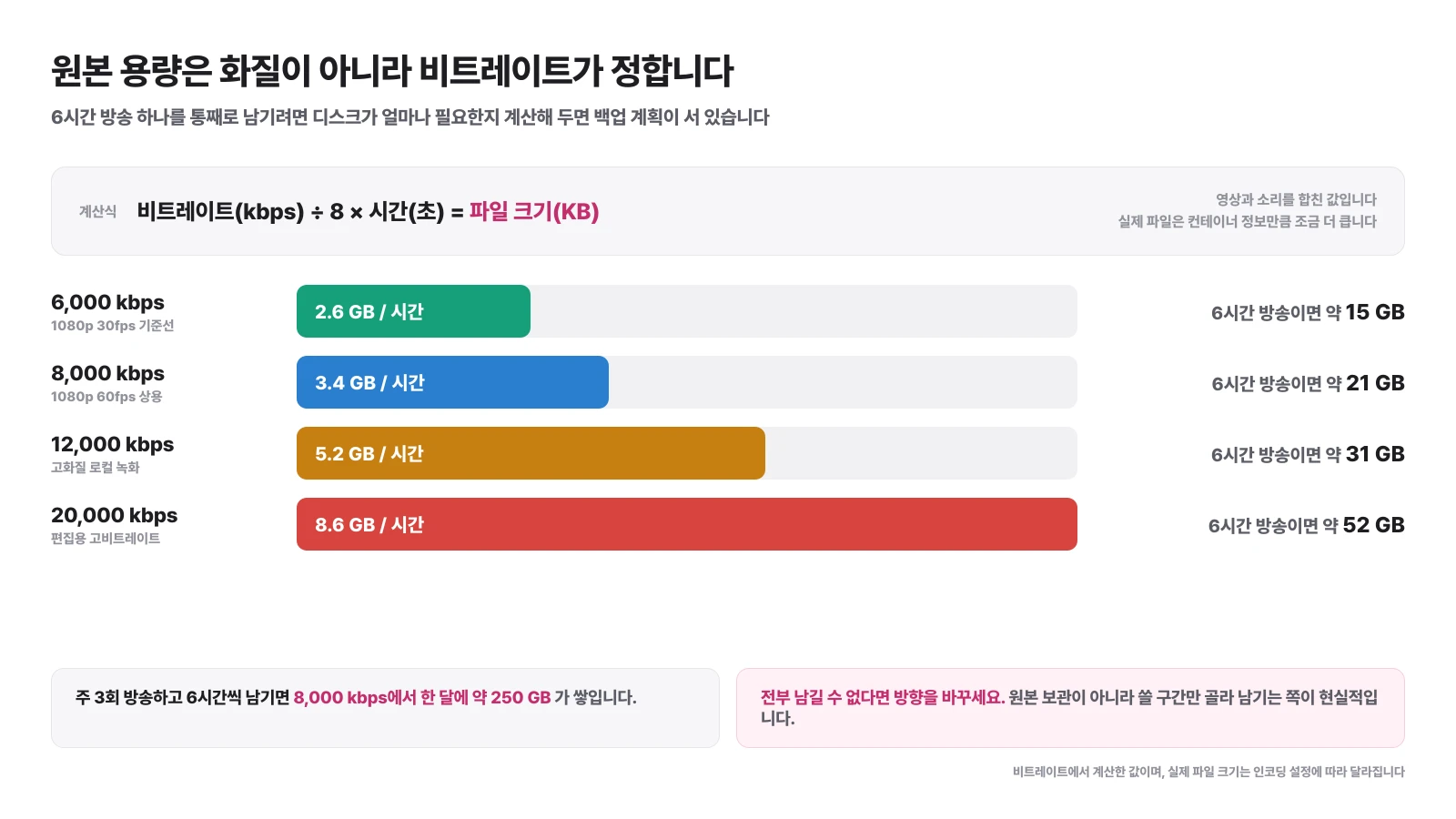
The calculation formula is simple. Divide the bitrate (kbps) by 8 to get kilobytes per second, and multiply this by seconds to get the file size. It is a combination of video and sound, and the actual file is slightly larger than the container information.
| bitrate | per hour | One 6-hour broadcast |
|---|---|---|
| 6,000 kbps | About 2.6GB | About 15GB |
| 8,000 kbps | About 3.4GB | About 21GB |
| 12,000 kbps | About 5.2GB | About 31GB |
| 20,000 kbps | About 8.6GB | About 52GB |
If you broadcast three times a week with 6 hours left each time, you will accumulate around 250GB per month even at 8,000 kbps. If you leave Keep Original as the default, your disk will collapse first.
How do I leave only a section rather than the entire thing?
If you first decide on the section you want to use and cut only the front and back, the size will be reduced by a few tens of times, and you can start editing right away. The problem is that it takes a long time to find that section after 6 hours of scanning.
The clue to choosing a section is already in the broadcast. The times when chats were concentrated, when donations were made, and when the situation in the game was overturned generally overlap with the candidates. If it is a forest, you can use How to find a section using star balloon records], and the order of selecting candidates in a long broadcast is summarized in Long broadcast editing.
ClipSpray, when you enter the replay address, it leaves a candidate section and a rationale for why it is this section. If you check only the candidates from a broadcast that is about to expire and leave the necessary parts, you can save both disk space and time rather than receiving the entire original and scanning it later.
What's different about receiving someone else's replay?
The rights structure is different between backing up your own broadcast and downloading someone else's broadcast. In my replay, there are layers of game companies and music rights holders, but in someone else's broadcast, the streamer's rights are added to it.
Czizyk's clip usage guide provides sharing methods of URL sharing and player embedding, and there is no mention in the document that re-uploading to external platforms is allowed. If the same scene is needed, it is better to cut it directly from the original replay so that the rights are clearer. Which floor is covered is discussed in detail in Broadcast Replay Copyright.
How do I organize the received files?
It's a backup only if you can find it later. Just keep it in a folder and you'll end up taking the time to go through it again.
Just three things in the file name are enough. This includes the broadcast date, main content or game name, and a mark to distinguish whether it is the original or a cut section. If you leave a note of the broadcast's expiration date here, you can just look at the list of what has already been kept and what is still dangerous.
If you also leave a chat log, it will be of great advantage when looking for editing points later. If you only have the video, you'll have to watch it again for 6 hours, but if you have the chat and sponsorship history, you can skip straight to the visual. The structure of continuing from one broadcast to long forms and shorts is summarized in Streamer YouTube Operation Method.
Frequently Asked Questions
Does Czizyk have an official replay download function?
There is no explanation about the download function in the Chzzk Customer Center document on how to save live video and the storage date. The document covers everything from creating replays, setting up publishing, and managing videos in the studio. Since there is a difference between not confirming and not existing, it is more accurate to check directly on the studio screen.
How do I download SOOP replay?
Just click the more (3dot) button in the VOD player to proceed with the download. In the storage policy change notice on June 1, 2026, SOOP also advised to download replays in advance if necessary.
I pressed the download button, but there was no response.
First, check whether the video is in acceptable condition. If the original live has an age restriction, paths that do not convey the login status will be blocked. If the video itself is not listed, either replay creation has been turned off or two days have passed without being posted.
The download stops midway.
First, check that each episode is divided into 17-hour segments. Longer broadcasts come in multiple installments, so even if it looks like you're receiving them all at once, they're actually multiple files. The next most common causes are lack of storage space and network outages.
How much space does it take to receive one 6-hour broadcast?
Calculated by bitrate. 8,000 kbps is about 3.4GB per hour, so 6 hours is about 21GB. If recorded locally at 12,000 kbps, the same broadcast would be approximately 31GB.
Can I get replays from other streamers?
This is a different issue from backing up my broadcast. Other people's broadcasts include the streamer's rights, the game company's rights, and the music rights. Rights relations are separately organized in the broadcast replay copyright article.
The received file does not play.
Often the steps to merge fragmented files into one are not finished. If ffmpeg is a tool required for merging, check whether it is installed and its completion log.
Source
Don't miss the moment when my broadcast explodes.
Just enter a replay link and the chat and sponsorship responses will be analyzed to create scenes to be made into shorts. I'll find it for you.
Try it for free with my stream10 vouchers upon signing up · No card registration
Share this post
read together
Creating a reel from a 3-hour broadcast: How to choose 15 seconds to write and move them vertically
2026-08-31 · About 12 min

How to find 30 seconds in a 6-hour broadcast and reduce streamer reel editing time
2026-08-31 · About 10 min
Reasons why editor recruitment is inconsistent, from division of work to unit price and settlement
2026-08-31 · About 12 min
